

Google has been taking steps to encourage websites to switch to the HTTPS protocol in order to enhance internet security. This initiative involves various modifications across its products, particularly in the Chrome browser.
HTTP is a web browsing protocol that enables us to browse websites and pages, but it is now considered insecure compared to HTTPS, which provides security by encrypting the information exchanged between users and websites.
The anticipated Chrome modifications will likely impact the uptake of HTTPS, as the browser is dominant globally, holding over half of the market share. In Brazil, Chrome’s popularity is even higher, accounting for at least 80% of the market, as per a Statcounter study.
Each Chrome update will progressively enhance the visibility of security warnings on HTTP websites. Google has disclosed a schedule of updates for 2018, although the project’s completion date remains unspecified.
To avoid unexpected outcomes later on, it’s important to review previous actions and anticipate Chrome’s approach towards HTTP and HTTPS websites.
In 2017, Chrome updates impacted only HTTP pages that contained form fields.
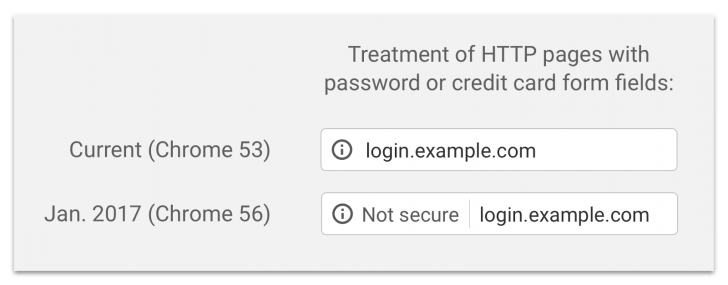
In 2017, Chrome introduced updates to highlight insecure websites using the HTTP protocol, particularly impacting sites gathering sensitive user information.
Chrome 56, released in January, began identifying page URLs as “unsafe” if they contained a password field or if there was user interaction with a credit card field.
chsyys/FreePik
In October of that year, Chrome got another update. This update made the browser show a warning message on all pages with user interactions, including contact forms and email registrations, as well as during anonymous browsing.
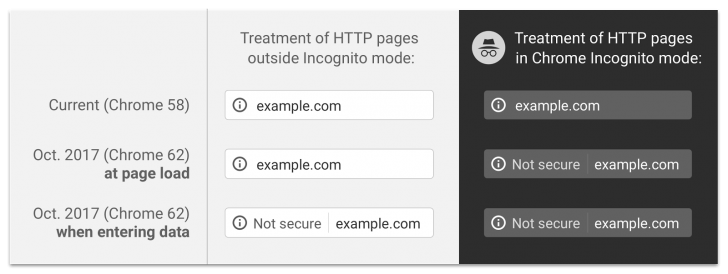
Update impacts every HTTP page in July 2018.
In 2017, only a few HTTP sites were subtly impacted by changes, whereas in 2018, all websites that do not follow the secure navigation protocol (HTTPS) are affected by updates.
A new Chrome update (68), scheduled for release on July 24, will label all HTTP pages as “unsafe,” whether they are institutional pages or blog posts.
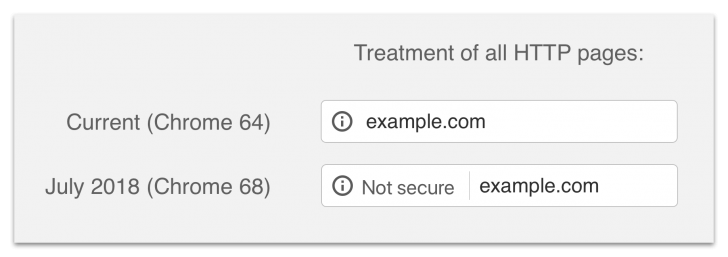
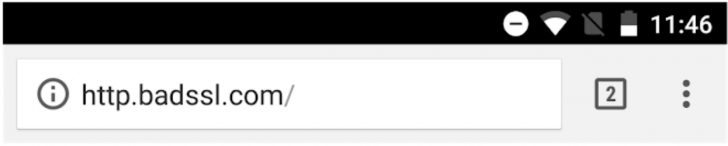
This update is one of the most important as the browser now clearly indicates to users that HTTP websites are not secure. This change is expected to have a detrimental effect on non-HTTPS sites, leading to increased visitor rejection.
Most platforms and websites should switch to HTTPS periodically for security reasons. If you remain unconvinced, consider the upcoming changes in Chrome updates.
In September 2018, Chrome will only bring changes to websites that use HTTPS.
In September 2018, Chrome 69 made a subtle change that only affected HTTPS sites by replacing the “safe” warning with something more neutral. The green color and the term “safe” were removed, leaving only the lock icon. Google may consider removing the lock icon in the future.
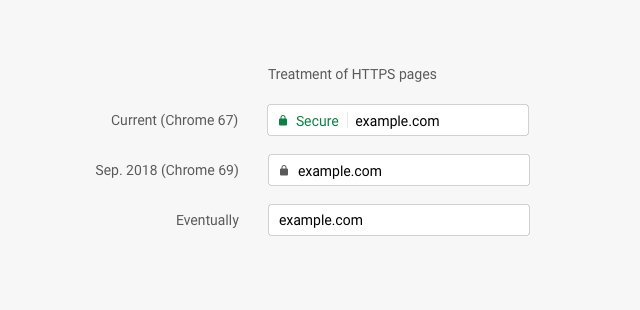
The change may seem odd at first, but it is necessary as HTTPS is expected to become the default protocol in the future. When this transition happens, secure websites won’t need to be marked, and the focus will be on identifying those that are not secure, as seen in the latest Chrome update in 2018.
Chrome’s non-safe warning was increased in severity in October 2018.
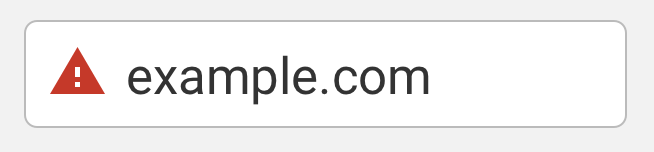
Chrome version 70, set for release in October, will intensify warnings for HTTP sites, displaying a red “unsafe” warning with an alert icon on all HTTP pages when users interact with certain elements.
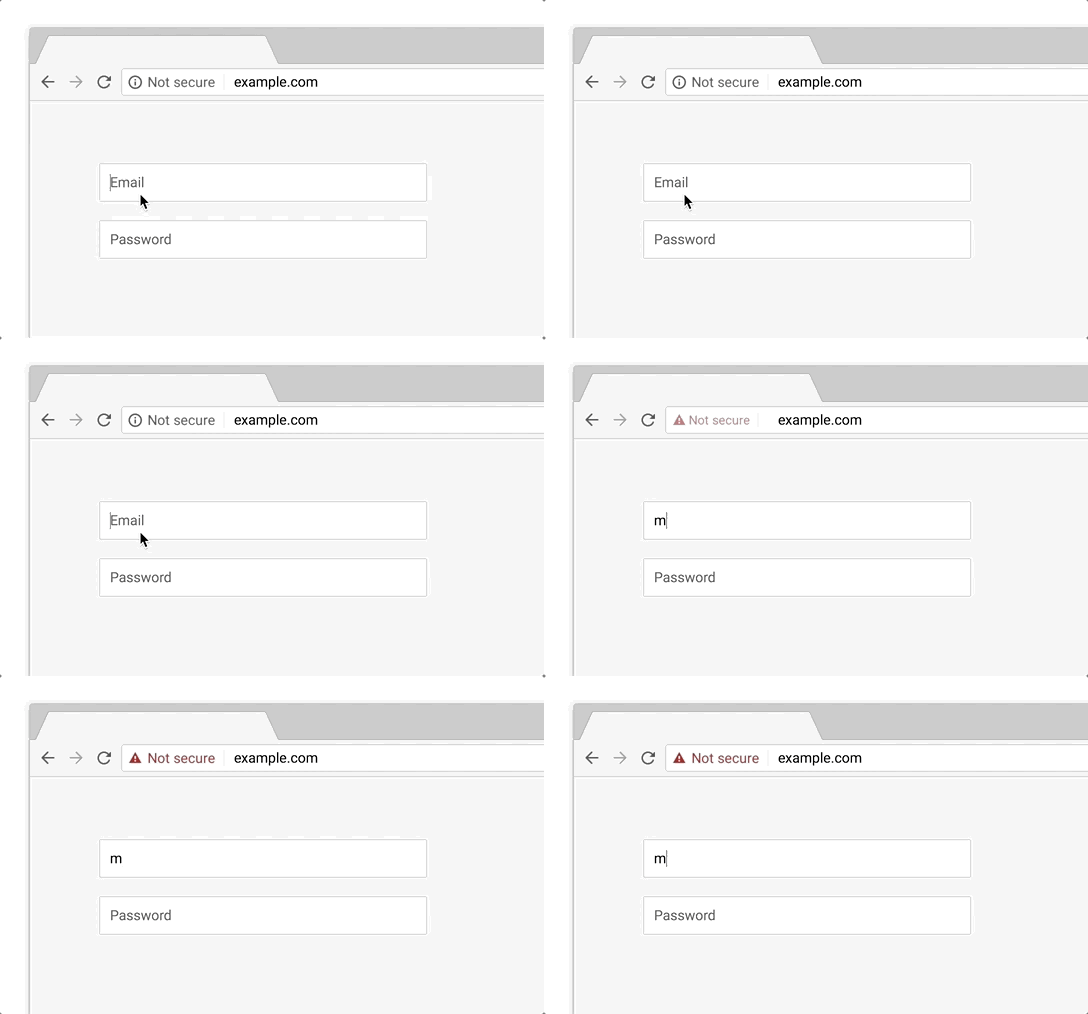
This modification will serve as a warning to websites that continue to use HTTP, and it will lead to further advancements, as explained later.
Future notifications about the Chrome warning for websites deemed unsafe
Chrome will soon show a red warning on all HTTP pages, not just those with certain fields, and will also treat insecure HTTPS pages the same way. This will apply to sites with HTTP URLs or expired SSL certificates.

HTTPS has been a ranking factor in Google since 2014.
Google started its popular search engine initiative years before implementing updates on Chrome since 2017.
In 2014, Google made efforts to promote the use of HTTPS by considering it as a ranking factor for search results.
Using HTTPS does not ensure a website’s top ranking on Google, but it can be a crucial factor that sets a site apart from its competitors. Ultimately, an HTTP site is unlikely to be prominently featured in search results.
Certain domain extensions are only compatible with HTTPS.
Google Registry, responsible for managing certain domain terminations, has recently enhanced internet security by ensuring that extensions like .dev and .app are secure by default.
These extensions, which come pre-installed with HSTS, require websites with listed domains to use the HTTPS protocol for all connections. Major browsers like Chrome, Firefox, Safari, Edge, and Opera include this list, ensuring that websites with these domains operate through HTTPS.
How to prevent the Chrome site warning for being “unsafe”?
HTTP websites will face more negative consequences from Chrome, the top browser globally. To prevent this issue, it is necessary to switch your website to HTTPS.
You must have an SSL certificate for your website to be able to operate under the HTTPS protocol. The process varies depending on the platform your website is on.
Website building platforms such as Wix, WordPress, and others.
Most tools come with HTTPS by default, but it’s important to verify if your site is labeled as “safe” or “unsafe” and make necessary configurations for HTTPS to work on platforms like Blogger.
Consider using a different tool if your website builder does not provide an SSL certificate, as sites without SSL are considered insecure and outdated.
Platforms such as WordPress and similar tools that rely on hosting services
If your website is hosted by a company, you must set up an SSL certificate on the server. Make sure to review the SSL certificate choices provided by the company, including both paid and free options.
Many platforms support Let’s Encrypt, a widely-used free SSL certificate with more than 50 million active certificates globally. Other companies also provide their own free SSL certificates in collaboration with certificate-selling institutions like Comodo.
If your web hosting provider does not include or plan to offer a complimentary SSL certificate, it might be a good idea to switch to a different hosting service. Many companies provide free migration assistance to new clients.
After you have installed the certificate, you must set up SSL on the website to ensure that all site URLs load only on HTTPS. For WordPress sites, there is a tutorial available that covers all the necessary steps for configuring SSL on WordPress.
Ready to enhance the security of your website? Explore our related articles for more information and feel free to leave a comment if you need assistance! 🙂
Publication date: 23/07/2018 (last modified on 11/02/2019)
SSL tags.