

Creating a website nowadays is simple and free with just an idea and an internet-connected device.
Many people begin their online journey with the help of free platforms like WordPress.com, enabling easy and cost-free website and blog creation. For some, their site remains a hobby, while for others, it becomes a profession, leading to the question of when to consider upgrading to a paid plan.
If you own or plan to have a website or blog on WordPress, this article is perfect for you. It covers the characteristics of each WordPress mode, allowing you to assess and choose the most suitable one for your needs. Ready to dive in?
Free WordPress and Paid WordPress have distinctions.
I created a summary for those looking for a more concise analysis before explaining the variations among WordPress plans.
We are comparing the different forms of WordPress: the hosted version by the company and the one installed on external hosting. If you are interested in the latter, refer to an article about WordPress.org.
| What situation do you fit? | Free WordPress | WordPress Paid |
|---|---|---|
| I’m just trying the tool | x | |
| I need a website/blog and have no financial resources | x | |
| My website or blog is just a hobby | x | x |
| I’m starting and I still don’t know if it’ll work out | x | x |
| I want to create a professional website or blog | x | |
| My project will have great personalization and features | x | |
| Preventing revenue from my blog or website | x | |
| I plan to create a virtual store with WordPress | x |
View the available plans on the WordPress website.
The decision between paid and free WordPress depends on your online project’s requirements and timeframe. Opting for the paid plan isn’t always the ideal decision.
We will now examine the resources provided in each mode, detailing their purposes and importance in various situations. This will equip you with the necessary information to make an informed decision. 😊
Domain customization
The distinction between free and paid versions of WordPress lies in the domain options available. In the free version, users must use a WordPress domain, whereas the paid version allows for any domain to be used.
When using free WordPress, the site name automatically includes “wordpress.” in the address, resulting in a structure like myblog.wordpress.com. This also applies to Blogger and Wix, where you are essentially using a subdomain of WordPress.
WordPress.com recently introduced new free domain options specifically for bloggers. In addition to using the traditional wordpress.com extension, users can now opt for addresses under a .blog subdomain, such as myname.design.blog. This provides another free alternative, albeit with certain restrictions. For further information, refer to our article on 3 methods for securing a domain in WordPress.
To be able to use a personalized address like myblog.com, you must subscribe to a paid WordPress plan. This option is offered starting from the Personal Paid Plan, which costs R$12 per month when paid annually.
Why choose a custom domain?
Having your own domain can enhance the credibility of your website or blog, as using free domain addresses like “wordpress.com” or “blogspot.com” may give a less professional impression to visitors.
Having a domain from the start is recommended to maintain visibility on search engines and avoid potential issues with URL changes impacting Google ranking.
WordPress provides a benefit in their paid plan by including a complimentary domain for the first year, saving users around R $ 40 to R $ 50. Subsequently, users are required to renew and pay for the domain on an annual basis.
In certain situations, opting for free WordPress may be the most suitable option. For instance, blogs or websites developed as a hobby or for testing purposes can effectively function on the free plan without the need for payment, unless additional features are desired.
Institutions or small businesses without income can still use the free plan, with the option to invest more in the future.
If you want to make a website for free, check out our selection of 17 website builders that are free to use, such as WordPress.
WordPress advertising
In the free WordPress plan, your site shows WordPress ads without any benefit to you. This does not occur in the paid plans.
Imagine running a company that offers free website creation services, with numerous users visiting daily to create and publish websites and blogs without any cost. However, the company incurs expenses for servers and other operational costs to support this service. This business model may appear unsustainable unless there are additional benefits or revenue streams in place.
By providing free offerings to users, the company accelerates advertisements on WordPress websites and blogs created using the tool, aiming to attract more users. This strategy encourages some users to upgrade to paid plans, generating revenue for the company.

If you have a free WordPress site, it may seem acceptable to have WordPress ads on your content. But for businesses aiming for a professional image, displaying ads could harm your brand’s reputation in the eyes of users.
To avoid showing ads on WordPress, you need to subscribe to one of the paid plans starting at R $ 12 per month, billed annually.
Storage space
WordPress.com plans vary in terms of the storage space available for saving site files. The free plan includes 1 GB of storage, while paid plans offer between 6 GB and 200 GB, which should be sufficient except for the free plan.
The space required on a website or blog depends on the type of content being published. Vector illustrations and images are lighter than photos, but additional space may be needed over time, especially with the free WordPress plan.
If you prefer to host videos on your website rather than using free services like YouTube, you will require additional space. With the WordPress.com Premium plan, VideoPress feature is available, utilizing a CDN to store videos without occupying site space. Additionally, VideoPress does not show ads like YouTube-hosted videos.
The free plan’s storage space provided by WordPress is ample for institutional websites, but may pose limitations for frequently updated blogs with numerous images over time. However, virtual stores might be able to work with the free plan, considering other constraints.
Themes and layout customization options
WordPress offers a wide selection of themes, with over 300 layouts available for use, including both free and paid options.
The plans vary in the number of themes offered. By choosing the Premium plan for R$ 26 monthly or higher, users can access premium WordPress themes. For the Business plan at R$ 83 per month, subscribers not only get premium themes but can also install and customize any WordPress theme similar to those available on hosting platforms.
Depending on your website or blog’s requirements, you may find that a premium plan offers a unique design and additional features tailored to your content.
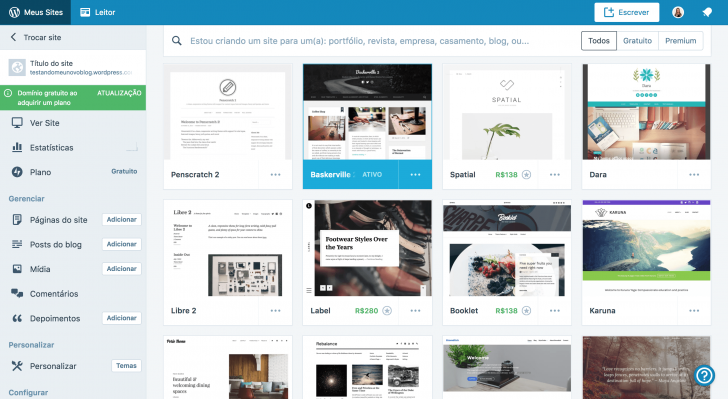
The Free and Basic plans have limited customization options, allowing changes only to color scheme, background, and default font styles within a restricted range of choices. This can provide a different appearance for your page, but may become frustrating when attempting to advance the design.
To have complete control over your site’s appearance on WordPress, you must have the Business plan or eCommerce plan. These plans offer more layout choices and allow you to modify the site’s source code if needed.

chsyys/Burst
Plugins are additional software components that can be added to a computer program to enhance its functionality.
Every website or blog requires unique functions, which can be accomplished with the help of plugins. These plugins can be utilized on the front end of the site, such as adding a virtual store or contact form, as well as on the backend for tasks like monitoring statistics, improving site security, and enhancing SEO.
Free and Personal plans offer the fundamental features of WordPress, while Business and eCommerce plans are the only ones that support plugin installation. This applies to a wide range of external plugins as well as JetPack, created and managed by Automattic, the company behind WordPress.
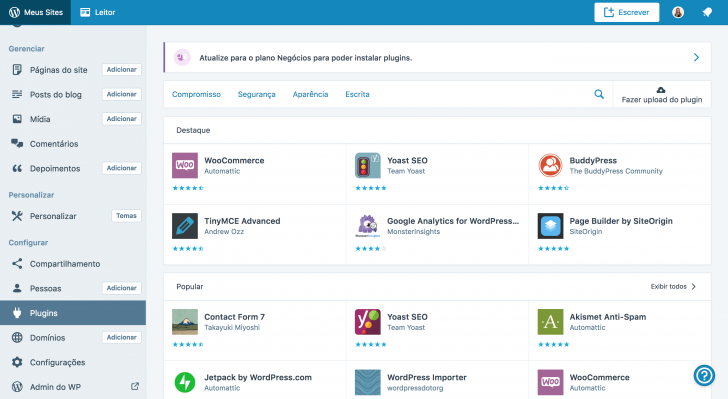
If you aim to create a professional website or blog with extensive customizations, you may need to opt for the Business plan or a higher tier on WordPress. The same applies if you want to set up an online store using WooCommerce, a plugin. Essentially, your choices are limited to selecting one of these plans or transferring your WordPress site to WordPress.org.
Is it beneficial to switch to WordPress.org?
Before deciding, take a moment to consider. Choosing WordPress.org means you will be in charge of handling all technical aspects of your website, such as hosting, updates, security, and performance. You may still need technical assistance to progress with your site. It could be a similar situation either way, so weigh your options carefully before making a decision.
If you desire more freedom and flexibility by using WordPress, consider following our guide on transferring your WordPress site to WordPress.org. This step is recommended for those looking to expand their WordPress capabilities and are comfortable with managing the technical aspects of their website or blog.
Seeker Optimization (SEO)
WordPress is known for being highly compatible with search engines, contributing significantly to its widespread popularity as the leading website creation platform globally.
There are two types of WordPress: WordPress hosted by the site owner (.org) and WordPress hosted by the platform (.com), both having different approaches to SEO despite their similar structure.
WordPress.org (self-hosted) provides increased control in comparison to Free and Basic plans, as optimization involves managing hosting, theme, and other component performance. However, this also entails greater responsibility for site administrators, potentially leading to poorly optimized WordPress if not managed effectively.
WordPress Business and eCommerce plans offer the same features as traditional website hosting services, allowing users to install SEO plugins like Yoast SEO and providing integrated SEO tools.
The optimal WordPress plan should consider your site’s objectives. If organic traffic is crucial for your site’s success, consider upgrading to a higher plan or the installed version. Alternatively, you can begin with a smaller plan and adjust as necessary.
Statistics – the science of collecting, analyzing, interpreting, and presenting data.
Visitor access information for the website is accessible across all subscription levels through the site’s admin panel on WordPress. Users can check visitor numbers, locations, popular pages, and other relevant data.
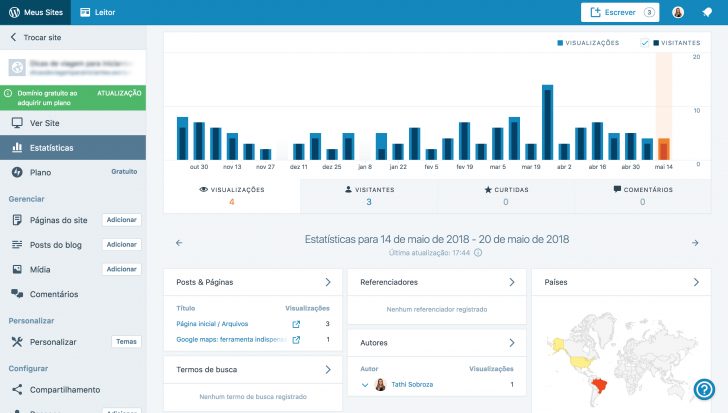
This tool, while convenient and user-friendly, is somewhat restricted in comparison to more advanced options such as Google Analytics, which requires a Premium plan or higher for access.
If basic statistics are sufficient for users, upgrading to the Premium plan or higher is recommended for those who heavily rely on Google Analytics.
Websites monetization
Many bloggers and website owners monetize their blogs and websites through ad manipulation, but this is restricted in certain WordPress plans.
Only the highest-tier plans offer advanced customization options like external themes, plugins, and ad monetization features, such as Google Adsense integration, which can be achieved through specific codes and scripts available in the WordPress Pro plan.
Ads cannot be shown on the Free plan, but it is important to note that this plan includes advertisements from WordPress.
[Tutorial] Learn how to set up a WordPress site in the installed version.
Assistance
The main contrast between free and paid versions of WordPress lies in the support offered to users. With the Free plan, users can avail unlimited access to tutorials and support articles created by the WordPress team, along with free webinars, video tutorials, and courses.
WordPress.org users are responsible for finding answers to their questions, although the vast WordPress community can provide assistance with various issues.
Customers on the Personal Plan can also reach out to the email support team for assistance, in addition to the resources specified earlier.
From the Premium plan onwards, customers receive live and priority chat support via email. This means that inquiries directed to the support team are addressed more promptly compared to other plans.
Having priority support can be very beneficial in certain situations. There is no substitute for speaking directly to someone you can relate to when you need help. If this level of convenience is important to you, you may want to think about opting for the WordPress Pro plan.
What should you pick: Free or paid WordPress?
The selection of the best option relies on various factors, but I aim to offer guidance with some suggestions.
When selecting a free WordPress option
- If you are just beginning and are unsure about the value of investing;
- If your blog or website is simply a pastime and you have no grand ambitions for it;
- If you lack the means to afford a package but desire to establish an online presence.
When selecting a premium WordPress theme:
- If you own a business website or blog and want to enhance its credibility.
- If you aim to transform your website or blog into a professional platform capable of generating future income;
- If you desire increased independence and adaptability in building your website or blog while still utilizing the conveniences of WordPress.
chsyys/UnPlash

chsyys/StockVault
WordPress.com offers different subscription options.
See below for a comparison of the features of free and paid WordPress plans.
| Resources | Free | Staff | Premium | Business | eCommerce |
|---|---|---|---|---|---|
| Price/month (covered annually) |
R$ 0 | R$ 12 | R$ 26 | $83 | R$ 149 |
| Field Customized |
No | yes | yes | yes | yes |
| Field Free 1st year |
No | yes | yes | yes | yes |
| Support via chat and email |
No | yes | yes | yes | yes |
| Storage | 1 GB | 6 GB | 13 GB | 200 GB | 200 GB |
| Personalization design |
Basic | Basic | Advanced | Advanced | Advanced |
| Themes Premium unlimited |
No | No | yes | yes | yes |
| Ad removal WordPress.com |
No | yes | yes | yes | yes |
| Simple payments | No | No | yes | yes | yes |
| Monetization site |
No | No | yes | yes | yes |
| Tools SEO |
No | No | No | yes | yes |
| Integration Google Analytics |
No | No | yes | yes | yes |
| Installation Plugins |
No | No | No | yes | yes |
| Submission of themes custom |
No | No | No | yes | yes |
| Functions e-commerce |
No | No | No | No | yes |
| Visit | Visit | Visit | Visit | Visit |
In paid plans, WordPress provides a free domain for one year and a 14-day refund policy for unsatisfied customers, allowing users to try the service without financial risk.
In closing
WordPress.com provides numerous options for individuals to create and publish their websites, either for free using WordPress or professionally by opting for the paid version. With dedication, one can easily develop a successful blog or website without incurring any costs.
I trust that I have assisted you in comprehending the distinctions among various WordPress options and determining the most suitable one for your requirements and schedule. If you have any inquiries, please feel free to leave a comment, and I will gladly respond.
Consider using WordPress.org if you require a versatile and tailored solution at a more favorable cost than WordPress plans offer. Learn how to build a WordPress site with our guidance.
Until we meet again! 😉
Published on May 23, 2018 and last updated on February 8, 2022.
Tags: WordPress Comparison