


After creating your website on Wix, you are eager to publish it online. Your first instinct is to search for it on Google as you want your site to be easily found by users.
Your Wix website is not showing up on Google search results, even when you search for the site name or relevant keywords, causing confusion and frustration as you try to understand the issue.
Stay composed if you encounter this scenario. The issue is likely easily remedied. Join me in this article to learn how to ensure your Wix website is searchable on Google! 🙂
Placing your Wix website on Google: A guide
There are numerous explanations for why a Wix website may not show up on Google, but the majority of them can be easily resolved. Here are the fixes for the most frequent issues.
Enable Google to index your Wix website.
Websites, including those created using Wix, may or may not be included in search engines like Google based on the owner’s choice, indicated by specific terms in the site’s HTML such as “noindex” or “index”.
One possible reason for not indexing a website is to keep it hidden from search engines during its construction phase. Another option is to pause publishing the site, but this may not be ideal if you need to share the link with others.
Often, website owners unintentionally leave their sites invisible to search engines by forgetting to remove a certain option after building them, resulting in the site not showing up on Google.
Wix site owners can easily access this information through the dashboard by clicking on “Manage the site,” then selecting the “SEO” option, and scrolling down to find the “SEO Status” section as shown in the screenshot.
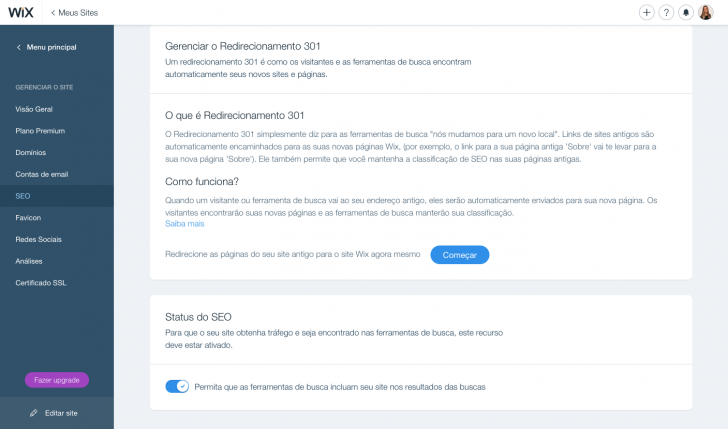
Wix Dashboard – SEO Section’s Status on Search Engine Optimization
To ensure your website is discoverable on search engines like Google, you must select this option (highlighted in blue). If it is not selected (greyed out), click to authorize Google to index your site.
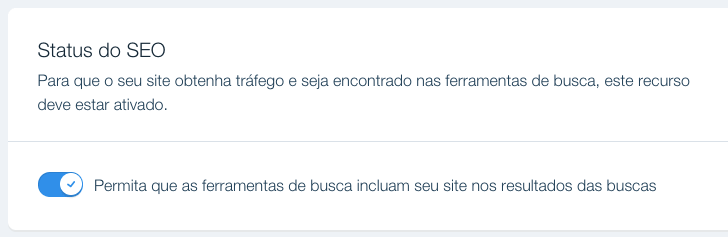
To ensure that Google can see the website, you must activate this feature.
2. Verify your Wix website on Google Search Console.
Google may choose not to include a website in its index, despite being visible to users, for various reasons such as having limited content or no backlinks, particularly for newly launched sites.
To enhance the speed of Google’s indexing process, it is advisable to sign up your website on the Search Console tool. This free Google service enables you to track your site’s visibility and effectiveness in Google Search outcomes, proving beneficial even for non-experts in the field.

chsyys/KaboomPics
Example of a Search Console dashboard in the classic version.
You can review your website in the Search Console by referring to a Wix help article. It only takes a few minutes and is important for you to know how Google views your site.
Wix websites, including free ones, can now be indexed by Google, so it is advisable to ensure your site is indexed regardless of your plan.
After reviewing the website in the Search Console, it is necessary to provide a sitemap in the tool, which serves as the site map. This enables Google to identify the current pages (URLs) and improve the speed and efficiency of indexing the site’s content. This process is straightforward and detailed in another Wix support document.
After submitting the sitemap, the column displaying the “undexed” URLs will show as “Pending.” Once the procedure finishes, you will be able to view the number of indexed URLs.

Classic version of the Search Console sitemap section
Utilize the Wix SEO Wiz tool to enhance your website’s indexing.
For your Wix site to be visible on Google, it’s crucial to follow the necessary steps. Simply completing these steps may not be sufficient. To appear in search results, your site’s key information must be easily accessible. If Google can’t comprehend your site’s content, it won’t be able to determine when to showcase it in search queries.
Wix SEO Wiz is a free tool designed to assist users in performing basic SEO tasks to improve their website’s search engine visibility, conveniently located within the Wix dashboard under the “Manage site” option.
You provide responses to a series of questions, and the tool initiates your SEO strategy. It outlines the necessary tasks and offers instructions for each one. Additionally, it checks the data you input for optimization.
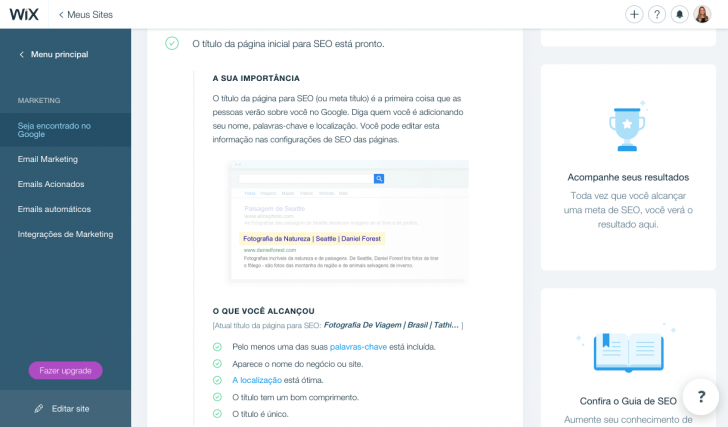
Example of the Wix SEO Wiz section
SEO can be complicated and technical, but this tool makes it simpler for anyone to perform basic SEO on their website.
I suggest following the steps of Wix’s SEO assistant to optimize your content for Google. Alternatively, you can also do SEO on your own by making edits directly on your site and pages.
Creating your website using these tips will ensure its visibility on Google, even if it’s just for your business name. Testing the same steps on a fictional Wix website without published content also resulted in it appearing on Google. Hence, following these guidelines will help your site to appear on the search engine.

A Google test was conducted using a no-cost Wix website.
But wait, there’s more to it. We will discuss further how SEO operates. Join me for more details!
I’ve completed all the necessary tasks, but I am unsure if my website has been included in the search engine index. How can I locate my Wix site on Google?
If after following the steps mentioned earlier, your Wix website still doesn’t show up on Google, explore other options.
Verify the indexing by conducting a search on Google.
To determine if a website has been included in Google’s index and to see which pages are included, conduct a search using site: followed by the website’s full address on Google. For instance, type site:https://www.google.com.br in the search bar.
Use your website URL to search and check how Google is indexing it. If Google does not show any results, it indicates that the site has not been indexed yet. If it appears in the search results, you will see a similar outcome with varying results based on the number of pages indexed.

chsyys/UnPlash
An illustration of a search outcome on Google for a specific domain
The visibility of the free Wix site I tested on Google indicates that it has been indexed. However, the site may have only the homepage indexed due to lack of content. If you encounter the same issue, do not worry as we can address it in Search Console, leading us to the next stage.
Examine the indexing status using Search Console.
You can monitor your site’s indexing status and track its progress in Google Search by using the Search Console tool.
To verify this data, visit Search Console and select the “Track” option, followed by “Sitemaps”. A screen will appear displaying the status of your domain’s sitemap sending and indexing.
chsyys/PixaBay
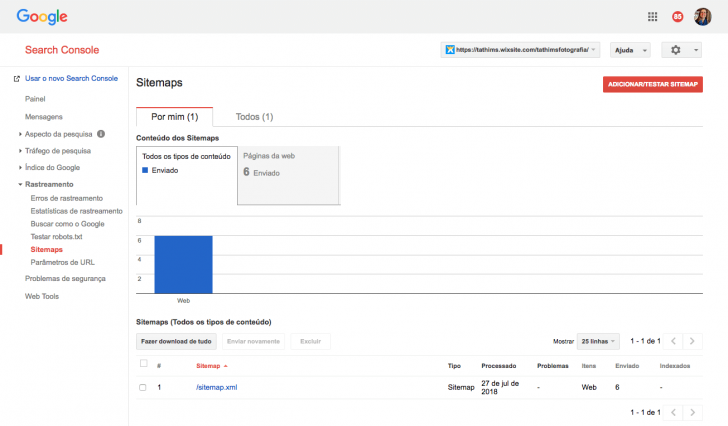
Classic version of the Search Console sitemap screen.
Search Console does not display the number of indexed pages in this instance, suggesting that Google might require additional assistance in locating the URLs of my website.
Enter the “Busk Like Google” option if you experience the same issue. Submit the URLs of the websites you wish to index by filling in the blank field with your page URL and clicking on “Swap and Render”, as illustrated in the screenshot below.
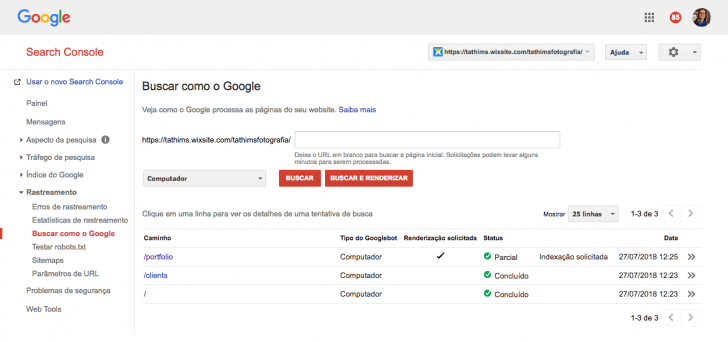
Enter the desired webpage for indexing and select “bus and render.”
Choose “request indexing” and confirm sending the URL for indexing by selecting the URLs you want to track before clicking “Next” in the opened window.

Request indexation by clicking and specify if you wish to monitor this URL exclusively.
The page is quickly indexed and appears in search results within minutes. After following the same process, the second page was also indexed by Google.
chsyys/KaboomPics

chsyys/Flickr
Google began displaying the manually submitted URL when searching for the example domain.
You can search and request URL indexing for your site in the “Busk Like Google” section. Each submitted page is reviewed by the tool and, if accepted, will appear in search results within minutes.
If you follow the correct steps, your Wix website can be indexed by Google even if it is straightforward and uses content from the Wix theme.
Is SEO really that simple?
Everything I have discussed regarding SEO may have made you see that getting your website on Google is straightforward. While this is partly true, the complete picture is more nuanced.
Placing your website on Google is not the same as achieving high rankings for specific keywords. Getting your site to rank well for desired keywords requires additional efforts beyond just being listed on Google. One effective strategy is utilizing tools like Google My Business to improve visibility.
To achieve a top ranking for a broad keyword like “wedding photo,” you will need to significantly increase your SEO efforts. The more competitive the keyword, the more challenging it is to secure a good position on Google.
SEO work can be difficult, time-consuming, and demanding in technical knowledge if you aim to increase organic traffic to your website. Simply having a site on a user-friendly platform is not sufficient; you must also focus on generating high-quality content, improving user experience, optimizing loading speed, and attending to various other factors.
To determine your website’s ranking on Google for a specific keyword, utilize tools like Search Console or Google Analytics. It’s best to avoid using the browser for this purpose, but if you must, make sure to use anonymous mode to prevent personal browsing data from influencing the results. Keep in mind that not appearing on the first page of Google doesn’t necessarily mean your site is not indexed by the search engine.
In conclusion
It is possible and straightforward to make your Wix website appear on Google by dedicating some time and utilizing the appropriate tools to ensure its visibility in search results. If you haven’t built your site yet, explore Wix through our review to determine if it suits your needs.
Consider using a platform like WordPress if SEO is a key strategy for increasing your audience, as it is more adaptable, expandable, and user-friendly for search engine optimization.
Compare Wix and WordPress in an article to understand the advantages and disadvantages of each platform before making a decision. Remember that the effectiveness of a tool depends on the user.
If you have any inquiries or wish to provide feedback, feel free to leave a comment, and I’ll be glad to reply! 🙂
Publication date: 31/07/2018 (revised on 27/02/2019)
Google, Tutorials, Wix are associated tags.