



If you own registered domains, it is likely that you have encountered the need to redirect a domain at some point. This action may be required in various scenarios, like registering an extra domain for a website or changing the URL of a page.
We will learn about the typical scenarios that require redirection in this article, as well as various methods for implementing these redirects.
To get directly to the point, refer to the list below and select the topic you’re interested in for further information.
- When to point a domain elsewhere
- Domain and DNS redirection refers to directing a domain name to a different location.
- What is required to change the domain’s direction?
- Common types of redirects frequently used
- Ways to redirect domains or pages include using hosting control panels, CloudFlare, server redirection on Linux with Apache, server redirection on Windows, and programming languages for page redirection.
- Redirection through a hosting control panel
- Redirecting domains and pages using CloudFlare.
- Linux server redirection using Apache
- Windows server redirection
- Page redirection using coding languages
- How to forward extra domains
- Redirecting domains in the Registry can be done by following these steps.
- Redirection through hosting control panel.
- Redirecting domains and pages using CloudFlare
- Linux server redirection using Apache
- Windows server redirection.
- Redirection of webpages through coding languages
When should a domain be redirected
There are certain situations in which you might have to forward a domain. Familiarize yourself with the primary ones.
- You have added a new domain to your website and want it to redirect to the main site.
- You have modified the URL of a page on your website and wish for the old address to redirect to the new one.
- You have registered a domain and wish to direct it to a specific address, like a profile on a social networking site.
- You aim to establish a URL structure for your website, such as ensuring that all pages contain www in the URL or implementing the secure HTTPS protocol.
If you relate to any of the scenarios mentioned above, you are in the correct location. Later, we will discuss how to establish these redirects. Initially, we will address key aspects of the topic that may lead to confusion.
Domain and DNS redirection refer to directing traffic from one domain to another.
The redirections discussed in this article are unrelated to DNS setup or configuration. The focus is solely on situations where a user accesses one address and is redirected to another.
Modifying the DNS settings of a domain may lead to redirects, although their intent differs from those mentioned here. This article focuses on redirects within the hosting server and on the web pages of a site.
To learn how to configure DNS-level pointing settings, refer to the article explaining DNS and its role on the internet.
What is required to change the direction of a domain?
Before implementing any redirects, remember to follow these steps:
- Register a domain name if you have not done so already.
- Hire a Hosting Service (with a few exceptions)
- Point the domain name system (DNS) to the hosting service.
- Redirect.
Let’s gain a clearer understanding of the following items.
Register a domain name
By registering a domain, you secure the right to use it and must connect it to a server for it to function. The registration lasts at least one year and can be extended continuously by the owner, serving as the initial step before taking any further actions.
Hire a hosting service (with some exclusions).
The hosting server is the computer that handles the traffic from users visiting the domain. It is where the rules for redirection are implemented.
Hosting is not always required for creating a redirect. Typically, domain registration companies do not provide redirection options unless the domain is linked to hosting. One exception is Registry.br, which offers redirection functionality through its control panel. This tool enables simple redirects, such as directing a domain to a social network.
Point the domain to the hosting server.
If the domain registrar does not support serverless redirection, you need to redirect the domain’s DNS to a hosting server by modifying the DNS entries.
Redirected
After registering the domain and linking it to a hosting server, the redirection setup can be configured in various ways. This can involve adjusting settings directly on the server or within the website’s files.
The chosen method of redirection should consider various factors, such as the target of the redirection (a single page, a whole domain, a URL format, etc.) and the user’s level of expertise. While hosting control panels provide user-friendly interfaces for setting up redirects, a programmer might prefer directly modifying a server configuration file for simplicity and efficiency.
Below are some potential situations and methods for redirection.
Common types of redirects
The selected method for redirection will be based on various factors, primarily the type of redirect desired, as mentioned at the start of the article.
chsyys/GettyImages
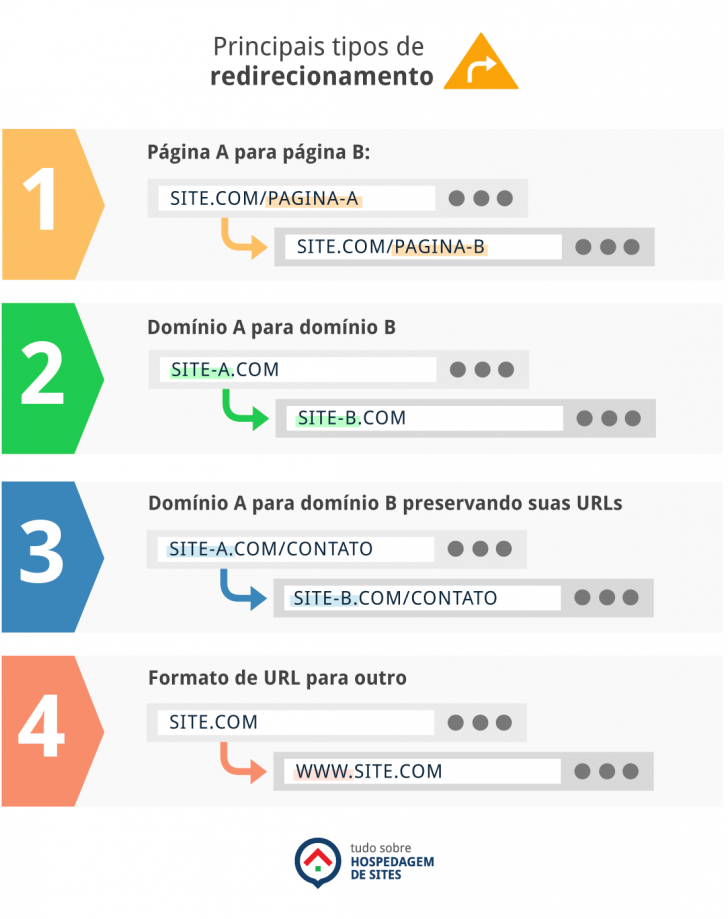
Common situations where redirection occurs include:
- Redirect page A to page B (e.g. site.com/page-a -> site.com/page-b).
- Redirect domain A to domain B (for example: site-a. with -> site-b.com).
- Redirect domain A to domain B while maintaining your URLs intact (e.g.: site-a.com/contact -> site-b.com/contact)
- Redirect one URL format to another (e.g., from site. with -> www.site.com).
Redirects can also indicate to both the browser and users the type of change that has occurred. Various categories exist for redirects, with the most common ones being utilized frequently.
- Permanent redirects (status code 301)
- Temporary redirects (status code 302)
If the domain change is intended to be long-term, it is advisable to choose a permanent redirect, such as a 301 redirect. This type of redirect signals to search engines like Google that the page or domain has a new address.
How to forward a domain or webpage
Now, we will discuss several methods that enable you to forward a domain or a single page to a different URL.
Redirection through web hosting management interface
Domain and page redirections can be challenging, especially for individuals not familiar with the subject. Additionally, implementing a redirect can be a sensitive process as it has the potential to significantly alter how a website operates. Any errors in this process can have negative repercussions, potentially resulting in the site being inaccessible.
Many companies provide the option to create redirects within the hosting control panel. Let’s explore a few examples.
HostGator Redirects
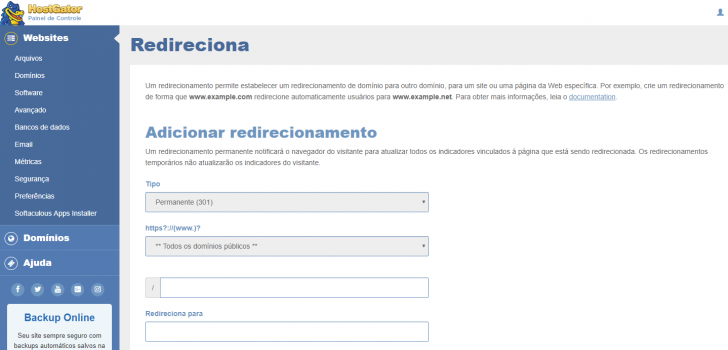
Redirections on HostGator can be set up through the cPanel control panel using the Redirections section. Users can select the type of redirect (permanent or temporary) and specify if it applies to a particular domain or all domains. Refer to the HostGator page for guidance on how to redirect URLs.
GoDaddy redirects.
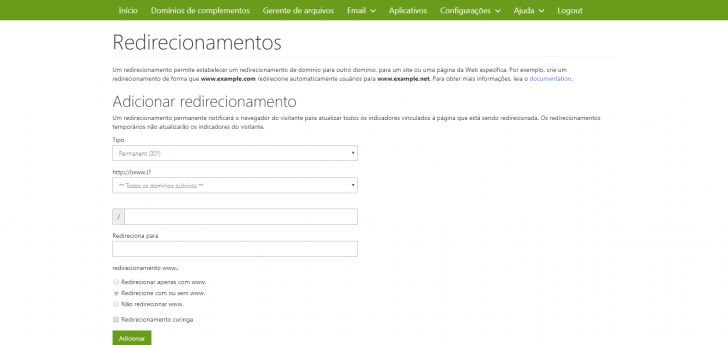
GoDaddy’s website hosting plans include cPanel for managing services, providing a similar domain redirection option as HostGator. The option may have a slightly different name, but in GoDaddy’s cPanel, you can locate the Redirection icon to access the configuration page for setting it up. To find out more about configuring this feature, visit the specified page in English.
chsyys/FreeImages
Redirections in Hostinger and WebLink
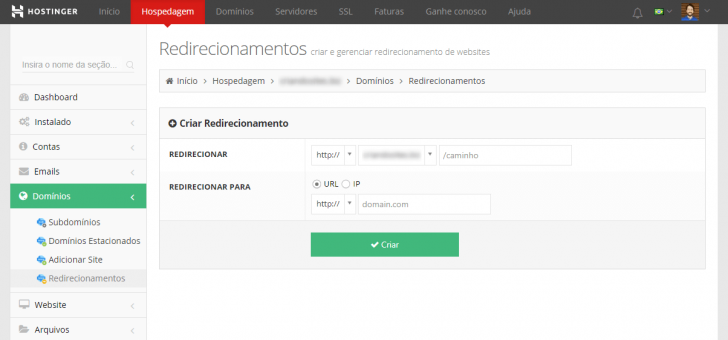
Hostinger and WebLink are part of the same group and provide comparable services, including hosting plans with either their own control panel or with cPanel. Hostinger’s proprietary control panel features a redirect function, with configuration instructions available on a specific page. WebLink’s instructions can be found here. The process for cPanel is akin to that of HostGator and GoDaddy.
chsyys/Burst
Redirections in Locaweb, UOL Host, and KingHost.
Locaweb, UOL Host, and KingHost hosting providers do not provide the ability to redirect a domain to the hosting control panel. They suggest that redirects should be done using server settings or in the site’s source code.
If you have a website with one of these companies and need to set up a redirect, you can explore different methods for configuring it. The setup options we will discuss are based on server and/or programming language and are not specific to any particular company.
Redirecting domains and pages using CloudFlare.
CloudFlare is a service that enhances website speed and performance while also safeguarding against spam and other virtual threats. The platform has developed significantly since its inception, now offering a variety of valuable and essential services for websites and applications.
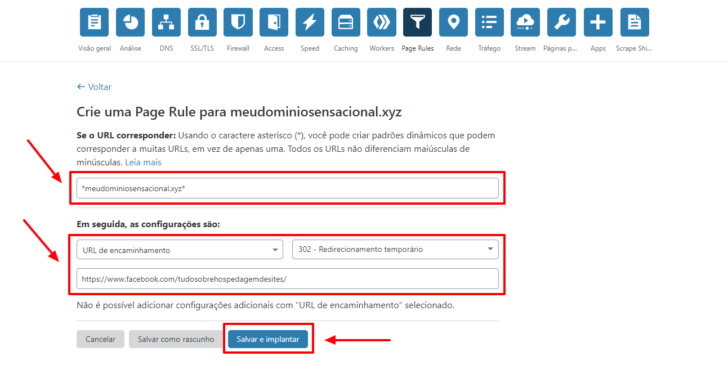
You can set up different kinds of redirects in CloudFlare using the Page Rules panel, ranging from basic to more intricate configurations.
chsyys/ShutterStock
To find out more, refer to this guide that demonstrates how to forward a domain on CloudFlare without requiring website hosting.
Linux server redirection using Apache (.htaccess)
Most active websites utilize the Apache web server, which allows for various settings via the .htaccess file that can be added to specific directories for rule creation, as per W3 Techs data.
To set up a redirect rule on a host using Apache (often found on Linux hosts), find the directory for your domain’s root and make a new file named .htaccess if it doesn’t already exist. Add the relevant code for your desired redirect. Here are some sample redirect scenarios that Apache hosting users can customize.
From one page to the next:
After using the “Redirect 301” command, specify the source page without the domain, followed by a space and the complete destination URL with http:// included. To make the redirect temporary, change “Redirect” to 302.
Save the file with the code included, then send it to the server and visit the old page address to verify the redirect. Consider clearing your browser cache if needed. Test the redirect using the browser’s “anonymous navigation” mode to avoid cache interference.
From one area to another:
Any request made to an address will be redirected to the same address in a new domain. This practice is commonly used when a website changes its domain but keeps the same URL structure. It is crucial to set up the redirect properly to ensure search engines like Google recognize that it is the same website with a new address.
The identical reasoning can be applied to compel website navigation with www in the address. The .htaccess redirection would appear as follows:
When visiting mysite.com.br/page1, the user is redirected to www.meusite.com.br/page1.
It is crucial to redirect all URLs to the secure version of the site (HTTPS) if the site has an SSL certificate. This can be done by using a rule in the .htaccess file.
Keep in mind that these are just samples and should be adjusted to fit each individual’s situation.
Windows server redirection
Windows Servers operate similarly to Linux servers when it comes to redirection. Redirect rules are specified in a file named Web.config, found in the root directory of the site. For instance, if you wish to set up a redirect rule for a site within the /meusite/ directory, you would need to modify the web.config file located at /meusite/Web.config.
To create a basic redirect from one URL to another, utilize this rule in your Web.config file.
If you have modified your website’s domain and wish to have the old site’s URLs direct to the corresponding page on the new domain, you can implement a rule like this:
Older editions of the Windows IIS server might not understand the rules mentioned above. Refer to this page for additional details on redirection on Windows servers.
Using programming languages to redirect pages
In numerous cases, it may be more convenient to utilize a programming language for a page redirect rather than altering server settings.
All programming languages utilized online feature a method for transferring users from one page to another. Let’s explore a few examples.
PHP redirection
PHP is a widely used language for creating websites on the internet. It is interpreted on the server before being sent to the user’s browser as a static HTML page.
Redirecting a page using PHP involves the use of the header() function, which transmits data to the browser prior to any content being displayed. Therefore, it is important to apply this function at the start of the file, before any other content on the page.
The following example informs the browser that the specified page has been permanently relocated and redirects the user to the new location.
The rule file must be manually inserted into each page you wish to redirect, as it is specific to the programming language.
Redirection using ASP and ASP.NET
ASP and ASP.NET, developed by Microsoft, are programming languages utilized on Windows servers, similar to PHP, in that they are server-side interpreted before being sent to the user’s browser.
To redirect a page in classic ASP, simply insert the redirection code into the page’s loading file, as shown in the following example:
To redirect a page in ASP.NET, you should insert the redirect code on the desired page, as shown in the example.
JavaScript Redirects
JavaScript, unlike PHP, is a language that is interpreted in the user’s browser, allowing your programming to be visible in the page’s source code.
To redirect a webpage to another using JavaScript, include a code similar to the following in the source code of the page.
Javascript redirections may not be as effective as server programming language redirects, especially if the user has Javascript disabled in their browser or if the script fails to load completely. In such cases, the redirection may not happen. Therefore, it is advisable to use an alternative method, rather than Javascript, for essential redirects such as address changes.
HTML redirection
HTML is not considered a programming language, but a form of markup found on all web pages. Programming languages like JavaScript can generate HTML code based on user interactions, allowing for real-time manipulation of elements on a webpage.
HTML can redirect a page by using a meta-type tag with the http-equiv=”refresh” attribute, specifying the time in seconds for the redirection to occur.
To redirect the page after 5 seconds, adjust the value preceding the address.
To enable HTML redirection, you must include the meta tag within the header section of the page you wish to redirect. The header in an HTML page is located between the
and tags.How to forward extra domains
It is typical for a website to have multiple domains registered to guarantee ownership of various domain variations related to the brand. For instance, a company with a domain ending in .com.br may also register the same domain with different endings like .com, .net, and others.
When this happens, it’s important to make sure that the extra domain will redirect to the main domain. This way, when someone attempts to visit the additional example domain, they will be redirected to the main example.com.br.
To achieve this type of redirection, like the previous examples, you must first register the preferred domain and link it to a hosting server. Subsequently, direct the domain to the server.
Some companies provide the option to include parked or mapped domains mirroring the main site’s content. This configuration, while straightforward, may not benefit those seeking search engine visibility as it can be perceived as duplicate content by search engines.
To prevent this issue, it is best to add a new domain to the hosting and create a 301 redirect to the main site. This will redirect any visitors trying to access the new domain to the main site, without displaying the new domain in the address bar.
The setup for this redirect is straightforward, but it is advisable to implement a server-level redirect instead of directing a single page. For instance, on a Linux hosting, you can insert a .htaccess file in the extra domain directory to set up the domain redirect.
The code should specify that all requests for that domain, including its subpages, will be redirected. For instance:
Using a programming language to redirect an extra domain is not advised, as the redirection will occur only when specific files are accessed, such as index.php or pagina.php. Thus, accessing URLs other than the base domain may not lead to redirection.
Server-level redirection, such as through .htaccess or Web.config, offers greater capabilities in this situation as it enables the establishment of rules that apply to all types of URLs and provide access to another domain.
Redirecting domains in the Registry is explained in the text.
Registration.br, a Brazilian organization in charge of managing all .br domains, offers a feature that enables domain redirection without requiring hosting setup. This service is exclusively for .br domains registered directly through the Registry’s website.
This function is beneficial for individuals who have acquired a domain name but have not yet created a website. It allows users to direct visitors to a social media page using their domain address.
Conclusion
We learned about the common situations that may require a domain redirection in this article. Additionally, we explored various methods for configuring redirects suitable for both technical experts and beginners in this field.
I trust that I have assisted you in reassigning a domain or page. Feel free to ask any questions by leaving a comment. Also, did you know there is a service that safeguards your internet registrant information? Explore further in an article on Domain Privacy.
Publication date: 17/05/2018 (last updated on 26/08/2020)
Tags: Registration.br, Tutorials