




A global hosting company, SiteGround, is no longer using the popular cPanel and has developed its own control panel over nearly three years.
The news received considerable attention and came out in the month after cPanel’s announcement in June 2019 about a major shift in license use and collection policy. SiteGround denies any connection between the two events, attributing it to mere coincidence. According to an employee responding to a client’s query on the company forum, predicting the cPanel issue several years ahead of time would not have been feasible.
SiteGround’s recent announcement about the updated panel generated a range of feedback from customers, with some expressing approval while others expressed disappointment over the removal of cPanel, a feature that influenced their decision to choose the company.
Changing the hosting panel is a complex and delicate process as it is crucial for various hosting functions such as managing websites, domains, and emails, especially since cPanel is widely used by professionals and companies globally.
The new SiteGround dashboard has improved in many ways, although some customers may not be happy with the change from cPanel.
If you want to learn about the change and what to anticipate with the new SiteGround panel, join me in this article. 🙂
The development process of the new SiteGround panel.
The company started developing the new SiteGround panel around three years ago, in mid-2016, replacing cPanel that was previously offered to customers. Currently, the company manages over 2 million domains.
The company had to recruit over 20 skilled professionals, including React developers, to create the new panel with customer features and website tools. The panel aimed to offer a quicker and mobile-friendly browsing experience, despite cPanel’s compatibility with mobile devices.
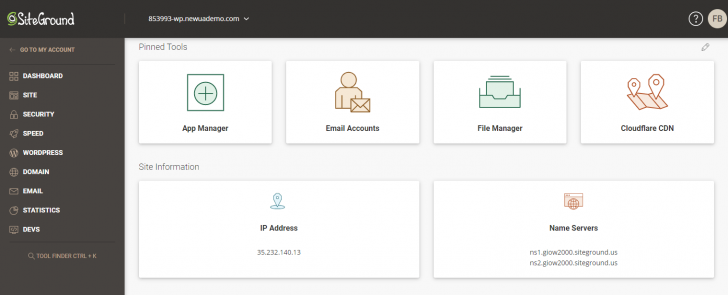
The new SiteGround dashboard is designed to cater to both non-tech users with a single site and agencies with multiple employees working on the same project, aiming to address the complexity often associated with cPanel. This focus on simplicity is a key feature highlighted in the new interface.
Discover information regarding SiteGround’s hosting options.

Why did SiteGround choose to introduce its own dashboard?
The company provided reasons for replacing the cPanel with its own panel, which can be understood by anyone familiar with how the cPanel works, regardless of their opinion on the change.
SiteGround stated that the rationales for creating your own tools were:
We had to move away from the idea of additional websites in cPanel, as it imposes restrictions on users and their website management options. With Site Tools, all websites are now equal in terms of features and capabilities.
We had to create our own access management to ensure that our new sub-user roles (collaborators and white-label sub-clients) could access the necessary levels of permissions.
We aim to simplify the process of adding new features by no longer being dependent on a third-party framework. This change will make it easier to introduce additional tools and maintain them effectively in the cPanel interface.
When will the transition to the new SiteGround dashboard, replacing cPanel, take place?
Since July 30, 2019, new hosting clients have been utilizing the updated customer dashboard, except for Cloud and dedicated server accounts of certain partners, as well as clients using Spanish or Italian languages.
Customers currently utilizing cPanel and the previous customer area will be transitioned to the new interfaces starting in September 2019. An automated script will be employed to convert all current add-ons into individual websites, ensuring the smooth migration of websites, emails, and other data. Customers will receive advance notice of the migration schedule via email.
Unfortunately, it is not possible to predict or delay the inclusion of the new SiteGround control panel. Users who wish to keep using cPanel must promptly decide on their next steps or alternative hosting options.
Current customers can access a demo version of the new SiteGround dashboard in their hosting accounts to try it out and address any queries before its full implementation.
How does the new SiteGround panel interface look?
The new SiteGround panel differs significantly in appearance from cPanel, with the aim of being distinct. However, it has incorporated features from the well-known panel to prevent any from being left behind.
The outcome was a control panel that impresses in terms of usability and efficiency, although this viewpoint may not be universal among all cPanel users.
chsyys/UnPlash
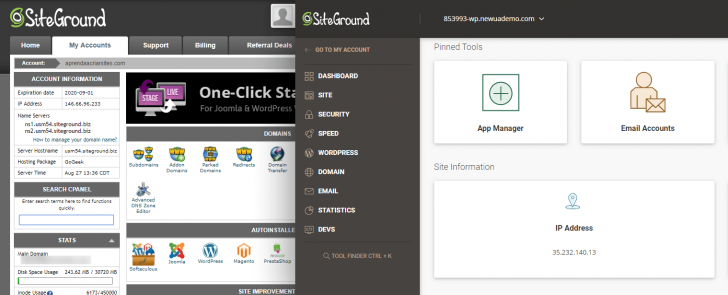
The new SiteGround dashboard offers numerous features, and I will focus on the ones that grabbed my attention the most.
One Panel
Hosting companies encounter challenges when trying to incorporate tools while using cPanel. At SiteGround, like other companies utilizing this panel, the client and cPanel account logins are kept separate, which can be confusing and inconvenient for users with few websites.
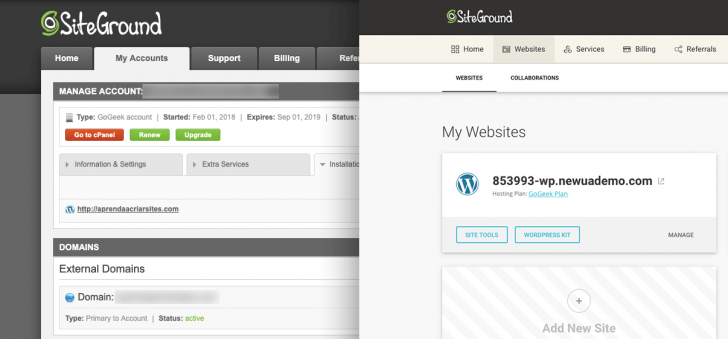
In the updated SiteGround panel, all functions and data are consolidated in one interface. This allows users to perform tasks such as setting up emails, purchasing new products, or modifying company information all within the same panel. The redesigned interface is particularly user-friendly and intuitive for individuals managing a small number of websites. Furthermore, the new dashboard provides an excellent mobile experience, enabling users to easily access and update their accounts from any device.
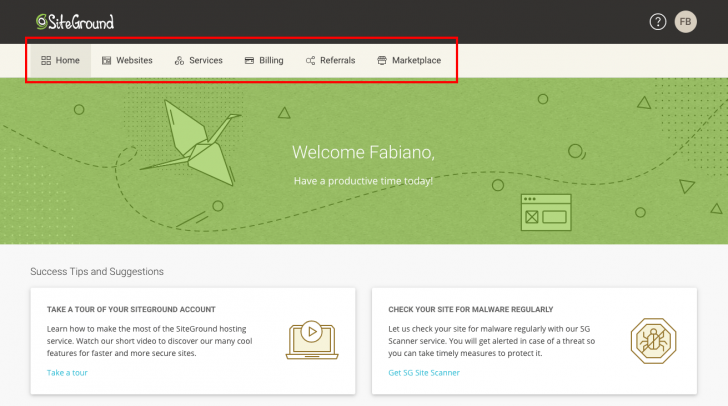
Approach focused on the website.
In cPanel, websites, emails, and domains are linked to the hosting account, making it practical for users with multiple websites. However, this structure can cause security concerns for certain users.
A company wanting to enhance its website hosted on cPanel may need to provide access to its cPanel account for a professional to carry out the service. Granting access to the cPanel account means the professional will have access to all websites and mailboxes associated with that account, potentially compromising security due to the lack of access levels per area within cPanel. While the professionals are typically trustworthy, it is crucial to acknowledge this security vulnerability.
The new SiteGround panel focuses on individual sites rather than hosting, making each site the primary unit for all activities within the interface. Hosting is viewed as a service that can be assigned to multiple websites based on the chosen plan. Additionally, various levels of account access are available.
The company made the decision to shift its focus towards helping customers create and manage websites rather than just providing hosting services, based on customer preferences.
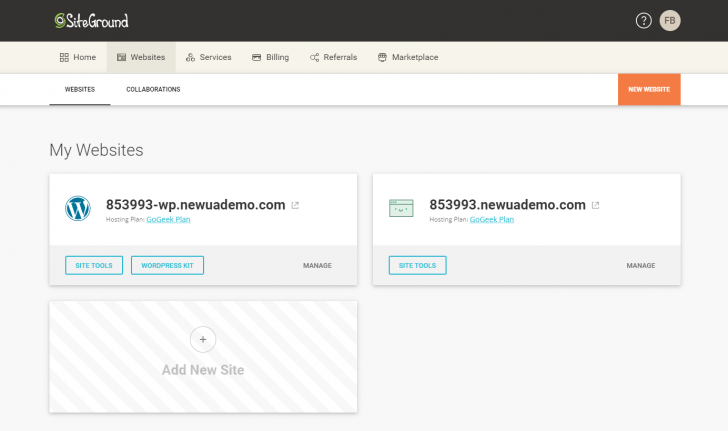
Each website under the new panel’s hierarchy receives its individual toolkit known as “Site Tools”. This feature operates independently for each website hosted within the account, allowing users to manage various aspects such as files, emails, domains, performance, and security.
The functions are similar to cPanel, but they are presented in a more user-friendly and easier-to-understand manner, especially for users with less technical knowledge.
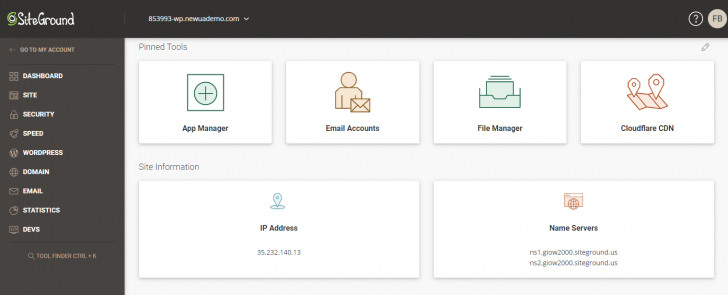
Simpler website development and hosting administration
The company stated that many clients have just one website, mostly small business owners, e-commerce stores, freelancers, and bloggers. As a result, they made improving the onboarding process for customers a top priority in designing the new interface.
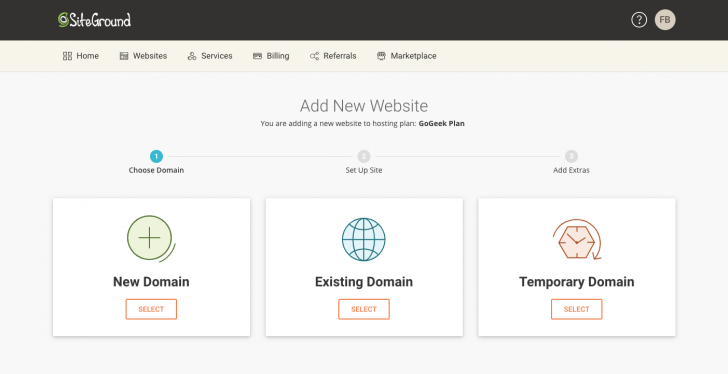
There was a significant improvement in the initial process of developing and launching the website. To create a new website, simply click on “New Website” and follow the tool’s provided instructions.
The initial decision involves selecting a domain, which can be either new, existing, or temporary. The temporary option, also found in cPanel albeit less straightforwardly, is beneficial for those beginning a website without a registered domain.
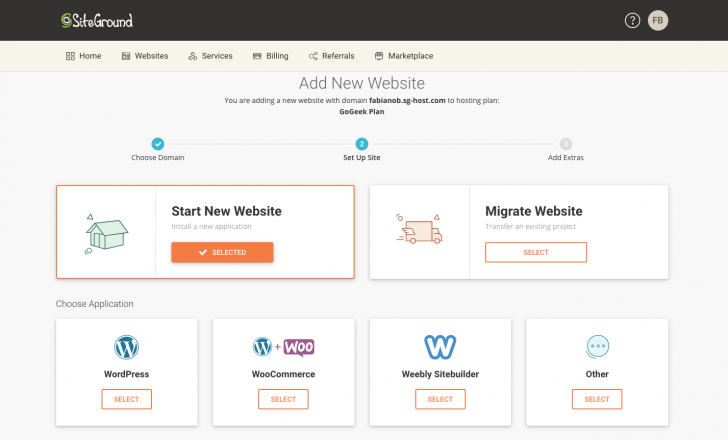
After obtaining the domain, the subsequent task is to establish the website by either installing an application like WordPress or transferring from a current site.
SiteGround maintained the ability to install applications easily by using Softaculous remotely in the backend, ensuring that customers can still access the automatic installer.
More than 30 applications can be found in the automatic installer, including WordPress, WordPress + WooCommerce, Joomla, Magento, Drupal, Moodle, Opencart, phpBB, and Prestashop.
Resources dedicated to WordPress
SiteGround is endorsed by WordPress.org, which is why it provides particular focus to users of this platform, considering WordPress is the most popular content management system globally.
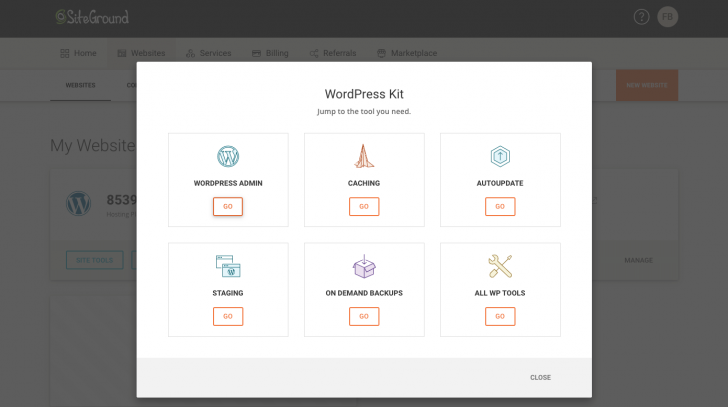
One of the features provided is the “WordPress Toolkit,” accessible for every website. With just a few clicks, users can easily access the WordPress admin panel (wp-admin), enable automatic updates, handle backups, set up caching for improved performance, and utilize other functions that may have appeared complicated for regular users.
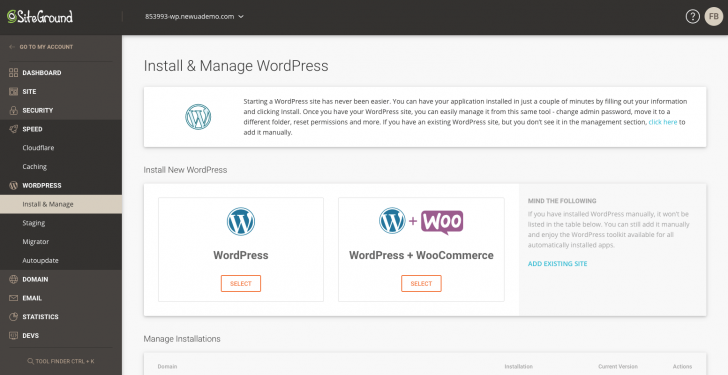
In the WordPress installation and management area, you can create new installations or handle existing setups. Actions include changing the WordPress admin password, resetting permissions, and relocating or deleting the application.

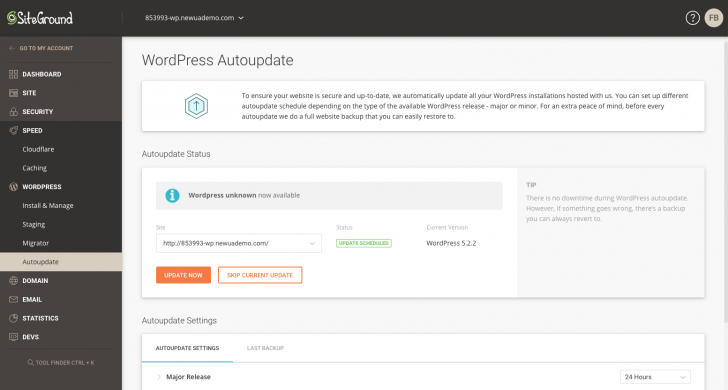
The other parts related to WordPress consist of a Staging feature for creating test site copies, a migration tool for automated site transfers using a specific plugin, and Autoupdate for customizing tool update schedules.
Tools for cooperation among agencies and independent workers
cPanel lacks users with varying levels of access, making it necessary to pay extra attention to security and collaboration in website projects involving multiple individuals, especially in agencies managing numerous websites and accounts.
SiteGround has created certain features based on customer input to enhance collaboration between companies and professionals such as agencies, designers, and developers.
- Websites can be easily transferred to customers by professionals or agencies using the new setup. The site can be initially created within the professional’s hosting account and then transferred to the customer with a simple click. This option is accessible in the customer area and allows for adding hosting recommendations and other necessary services along with transferring ownership.
- Customers on GrowBig (or higher) plans can invite outside agencies or professionals to collaborate on projects by adding them as contributors from the customer area. This feature enables these collaborators to use the site’s tools and submit tickets without needing access to the customer’s main account. Additionally, employees can be added to projects for team-based development.
- Customers can access Site Tools without any mention of the SiteGround brand through the white-label feature, which is available on GoGeek or higher plans. This feature is beneficial for businesses that offer combined site management and hosting services and is commonly used in hosting resale through cPanel and WHM panels.
One benefit of the mentioned features is the ability to manage all activities with a single login. For individuals involved in website development and hosting, juggling multiple logins for various customer accounts is a common practice. However, with the new SiteGround panel, users can conveniently access all their owned or managed sites using just one login from their customer area.
Explore the top hosting reseller options.
Developer tools
The new SiteGround panel was designed primarily for non-technical users, but the company has also considered the needs of technical users by recreating almost all resources from cPanel in a more accessible way.
I will not go into detail about the topic due to the extensive list of cPanel features, which is not my expertise. Instead, I will mention a few important features found in the new panel.
Developers across various sectors of the website frequently utilize Git repositories to create and oversee one or more application repositories, enhancing their ability to manage updates efficiently.
Cron Jobs, available in cPanel as well, enable automation of commands or scripts on a website, allowing scheduling of tasks at specified times or intervals.
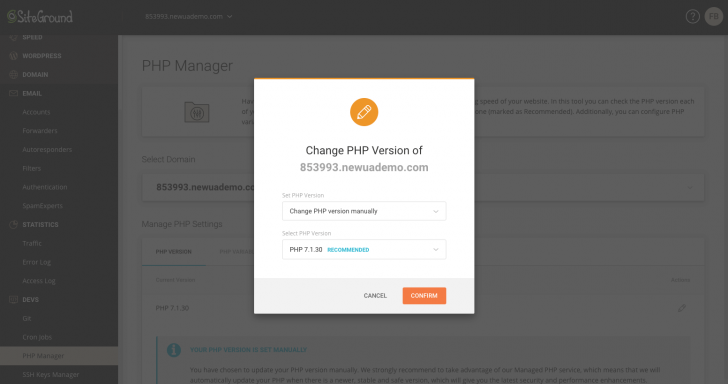
In the PHP Manager section, you can easily view and update the enabled PHP version for your application with a simple click, unlike other control panels where this information is often harder to find. It highlights the significance of maintaining an up-to-date PHP version for your hosting.
In the SSH Keys Manager section, you can handle current SSH keys and create or import new ones. SSH allows secure site access via encrypted connections, enabling file management, permission adjustments, and direct server file modifications. SSH keys are required for these tasks. Refer to our article for more information on SSH usage in web hosting.
The company is working on various new features, including a soon-to-be-implemented primary domain change and future integrations with tools such as Google Workspace.
Conclusion regarding the updated SiteGround dashboard
SiteGround has successfully implemented a new interface that is user-friendly, visually appealing, and accessible on mobile devices. However, it is unfortunate that the interface is not yet available in Portuguese.
The company finds it beneficial to switch to their own panel due to increased flexibility in tool creation and maintenance, lower costs compared to cPanel, and alignment with recent trends in the hosting industry.
Since the early days of websites, I have observed a shift in the market towards a growing customer base that seeks professional services for website creation and hosting, a departure from the past when individuals had to rely on webmasters for even minor site updates.
Several site creators have been launched in recent years, indicating a significant expansion in the industry. Agencies have also evolved to handle clients’ online presence, often providing accommodation management services. Hosting companies are adapting to these changes accordingly.
Professionals with expertise are moving towards alternative solutions that have adapted to the growing demands of sophisticated websites and applications. This trend has led to the rise of cloud services such as AWS, Google Cloud Platform, and Azure, gaining significant market share.
Users who are used to cPanel and utilize its advanced features may notice significant differences in the new SiteGround interface, potentially leading to difficulty in finding certain functions. Feedback from users, particularly those managing multiple cPanel accounts, suggests that this change may be overwhelming for them.
Hosting companies may soon modify their prices for accounts with numerous websites due to the recent shift in cPanel pricing. Additionally, more companies might transition away from cPanel to develop their own solutions, signaling a changing industry landscape.
SiteGround Information
SiteGround is a company that is not widely recognized in Brazil yet, but it has been expanding quickly in various global regions since its establishment in Bulgaria in 2004. The company also has offices in the United States, United Kingdom, and Spain, along with data centers across North America, Europe, and Asia.
I have been monitoring SiteGround for a while now and have observed a twofold increase in the number of hosted domains in recent years. The company currently boasts more than 2 million hosted domains and employs over 500 staff members.
SiteGround is recognized for its reliable and top-notch hosting services, with a wide range of features and excellent customer support. It is competitively priced at $3.95 and is recommended by WordPress.org. The only drawbacks are the lack of payment options in Brazilian Real and Portuguese support.
To learn more, check out our review of SiteGround or visit their website.

chsyys/GettyImages
Publication date: 28/08/2019 (latest update on 16/06/2023)
SiteGround tags are used.