



If you have a website and use a hosting service, you have likely encountered a control panel. While basic control panels provide resources for managing websites and emails, those overseeing multiple sites on one server may require more advanced solutions. The WHM panel is a notable choice known for its robust management and resources.
This hosting control panel, also called cPanel WHM, is one of the most powerful in the market and regularly gets new features and updates. To learn more about the WHM panel, continue reading this article!
What does WHM stand for?
WHM is a Linux hosting server software designed to simplify server maintenance tasks through a user-friendly graphical interface. It is built using the PHP programming language. The abbreviation WHM stands for WebHost Manager, which can be translated as web hosting manager.
WHM is not just a basic control panel; it offers the ability to oversee different server functions like DNS and SSL certificates, as well as manage hosting subaccounts, making it particularly useful for hosting resellers or companies with multiple websites on a single server.
Discover the top PHP hosting providers in this comparison.
WHM and cPanel

WHM offers the cPanel control panel for managing hosting accounts on the server, particularly for advanced hosting services like resale, VPS, and dedicated servers. This option includes access to both WHM and cPanel, allowing users to create separate hosting accounts.
The WHM is the primary panel for overall server management, while the cPanel is used for managing individual hosting accounts within the WHM and can have multiple instances in a single WHM installation.
The user with access to WHM can control all cPanel accounts within WHM, but the reverse is not true: a user with access to a cPanel account cannot access the WHM panel. This system enables specific cPanel account access to be allocated to clients or professionals whose authority is limited to a specific website or hosting account.
WHM, despite its complexity, is beneficial for any professional or company looking to oversee advanced server features, not just resellers or hosting companies.
WHM’s ability to grant root access in certain instances expands its configuration options, making it a valuable tool for creating cPanel subaccounts, particularly beneficial for resellers, hosting companies, and businesses managing multiple websites on a single server. This is just one aspect of WHM’s powerful control panel.
How to set up hosting accounts using WHM can also be found in the guide.
WHM and WHMCS
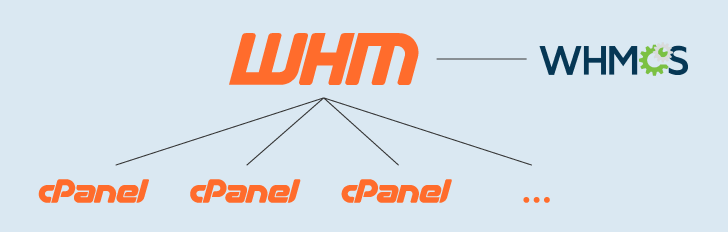
WHMCS is a supplemental panel designed for website hosting companies and resellers, serving as an extension of WHM alongside cPanel.
WHMCS provides a customer dashboard that includes features such as customer management, automated billing, integration with domain registration services, and a support ticket system. Customers also have access to a financial panel to manage their hosting services.
WHM must be manually integrated with WHMCS, unlike cPanel, which is included in all WHM installations. Some companies providing resale plans, VPS, and dedicated servers with WHM offer a complimentary WHMCS license, or it can be obtained separately if not included.
WHM General Information
WHM is a robust control panel used for hosting servers, featuring numerous valuable functions tailored for hosting administrators’ daily tasks.
Overview of WHM Panel
The WHM homepage is viewed after logging into the dashboard and provides a summary of panel features. It contains links for managing hosting accounts and server administration.
The image below shows convenient access to features for setting up new hosting accounts, managing accounts, creating hosting packages, accessing the resale center, using transfer tools, and managing backups. The server management section includes tools for monitoring processes, services, and disk usage.
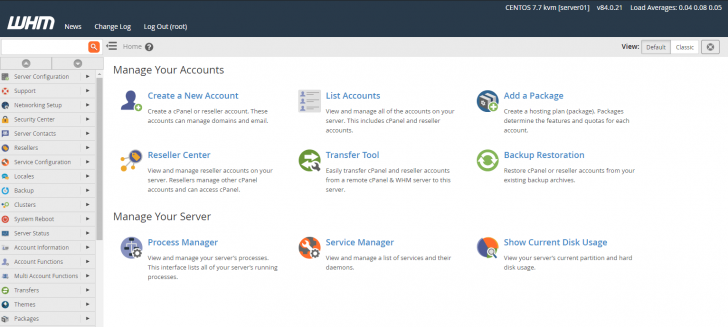
WHM’s default interface is mainly designed for handling hosting accounts on the server. If users prefer the initial access to be more focused on server management, they can switch to the “classic” version by clicking on a link at the top right corner of the page. This change will adjust the homepage links to display functions such as server configuration, reboot, system status, and DNS configuration.
In the image below, you can see the traditional preview of the WHM homepage.
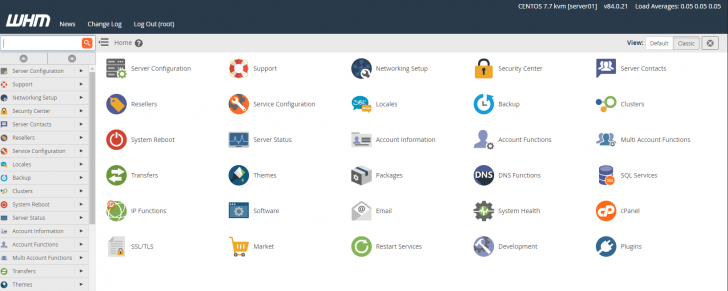
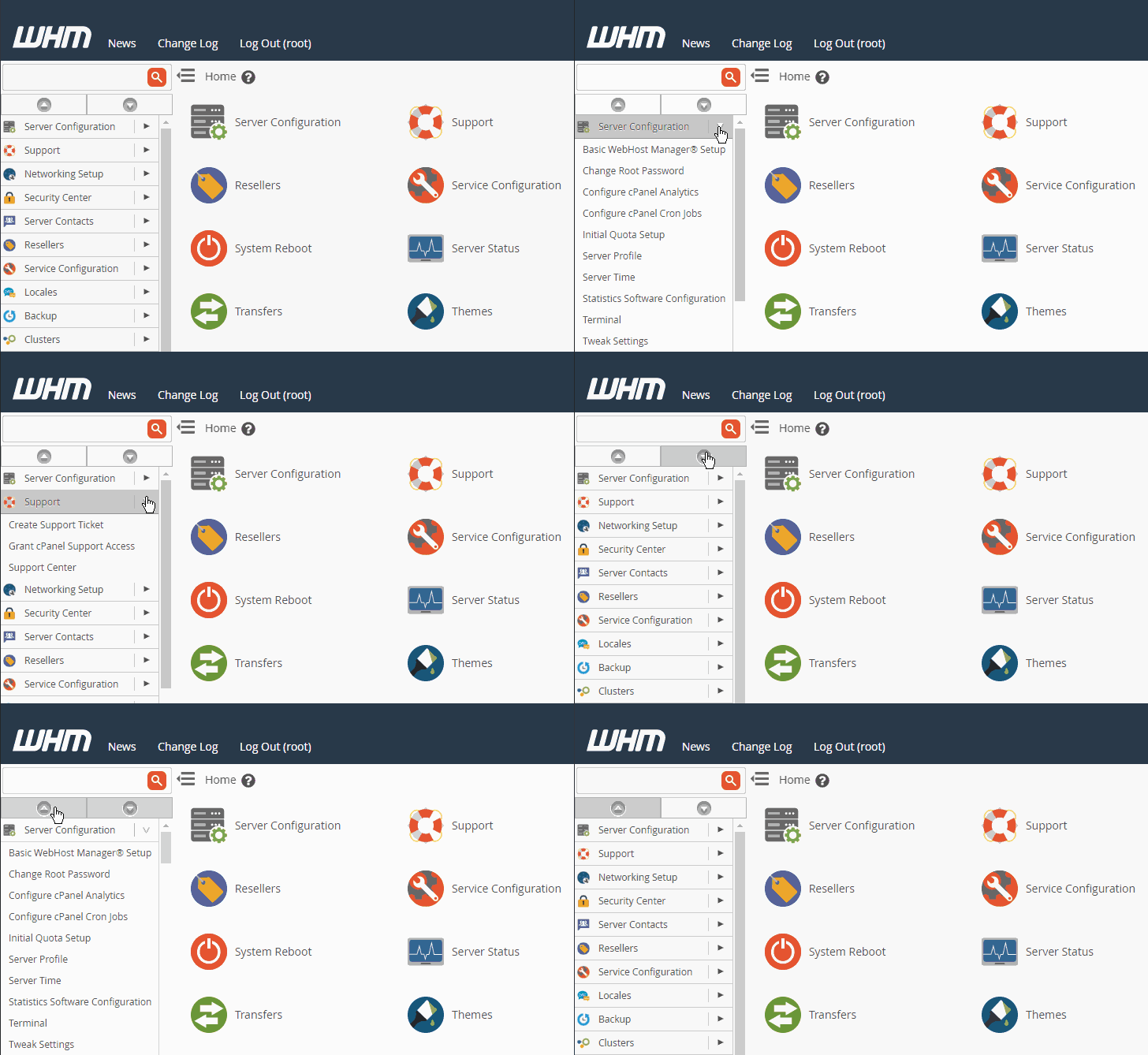
All links found on the homepage are also accessible through the side menu. The homepage features a curated collection of essential links, with the side menu offering a wide array of options and features. The side menu serves as a comprehensive representation of the WHM’s capabilities, providing users with a glimpse of its power. The image below showcases the options available in the WHM side menu in version 84.
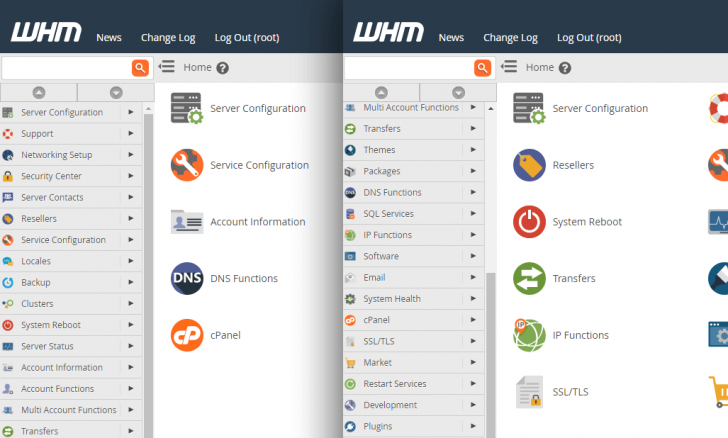
Each menu item offers multiple suboptions. You can access the sub-menus by clicking on the item directly or expand all subitems at once using the down arrow located at the top of the side menu. The down arrow reveals all subitems, while the up arrow collapses them.
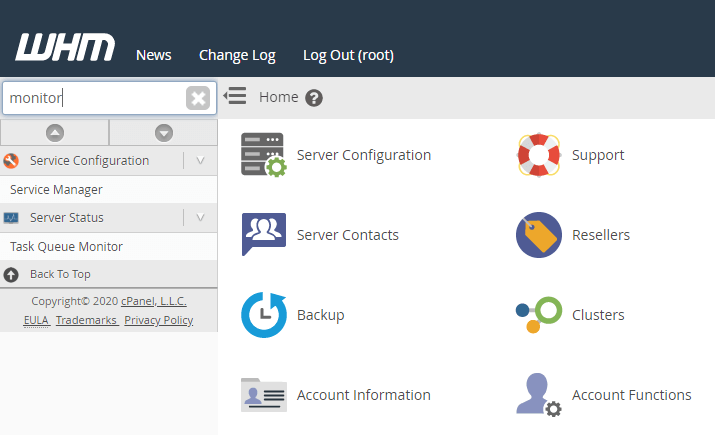
Side menu items can be sorted by using the search box located at the top of the menu.
Now that we’ve examined the WHM panel, we will explore some of its main features. While we can’t cover all of WHM’s resources due to their abundance, we can still gain a good understanding of its operation through the topics discussed.
Server settings in general
The initial item shown in the WHM side menu is the server settings section, where essential server configurations, including IP addresses and server nameservers, can be set up.
chsyys/Burst
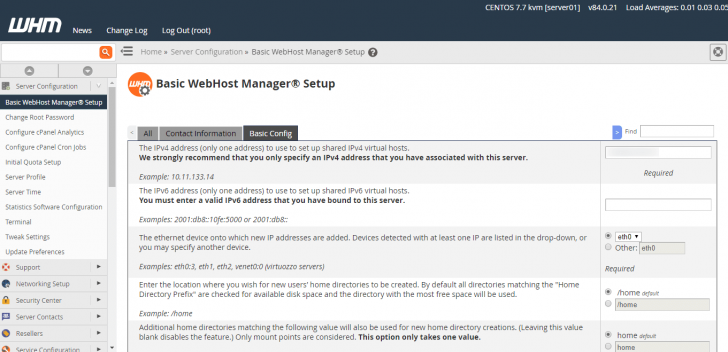
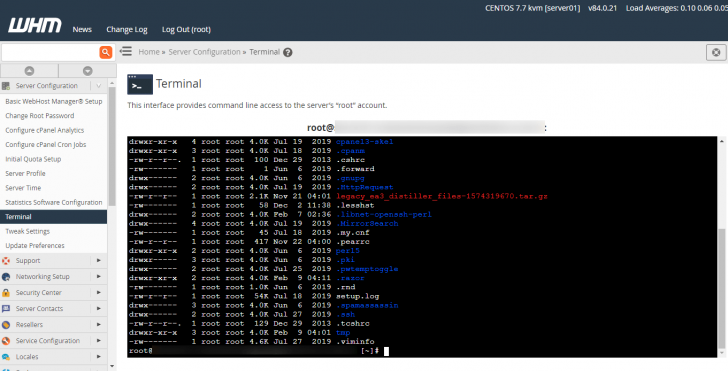
In the remaining items of the section, various choices are available including altering the server’s main password, configuring usage statistics, setting up cron jobs, and more. Additionally, a terminal can be accessed directly in the browser without requiring SSH setup in an external terminal, although the latter option is also feasible.
There is also the option to modify the default server configurations, like the maximum number of emails sent per hour and PHP settings, among others.
WHM automatic updates
WHM can automatically update versions, making it easier for server administrators. In the Update Preferences section, you can select the release layer for automatic installation, with the default being the latest stable version.
chsyys/PixaBay
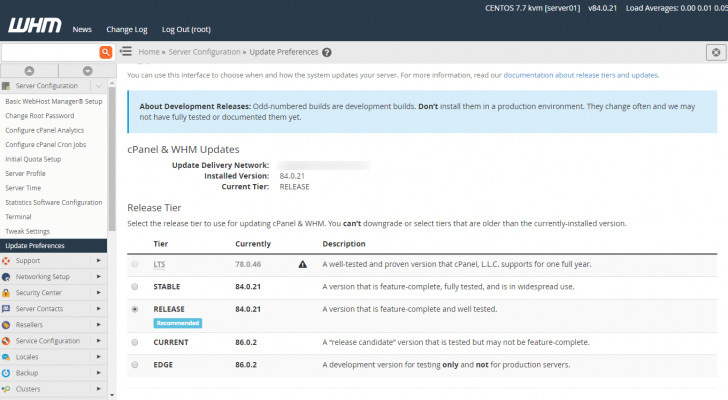
Updates can be set to occur automatically, although this setting can be adjusted if needed. Despite automatic updates, it might still be required to manually restart the server for certain installations to be completed. A notification will be displayed at the top right of the panel’s pages when a reboot is necessary.
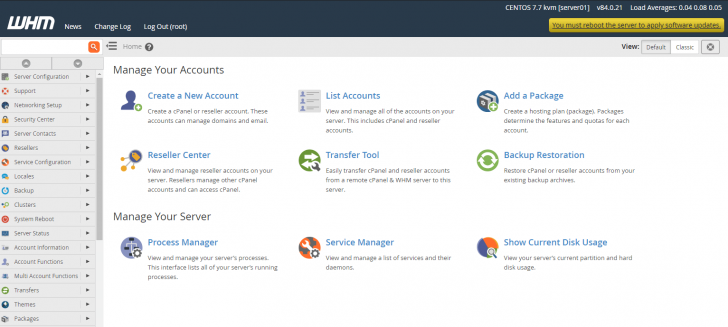
The server restart process typically lasts for a short period of time.
Management and setup of hosting accounts (cPanel)
In order to host websites effectively, it is essential to create hosting accounts with cPanel access, which can be shared with clients or account administrators. Users with access to WHM can manage all created cPanel accounts.
When you go to the Account Information section in the side menu, you can use different features related to the hosting accounts on the server. The initial suboption (List Accounts) shows all the current cPanel accounts on the server and enables the setup of new ones.
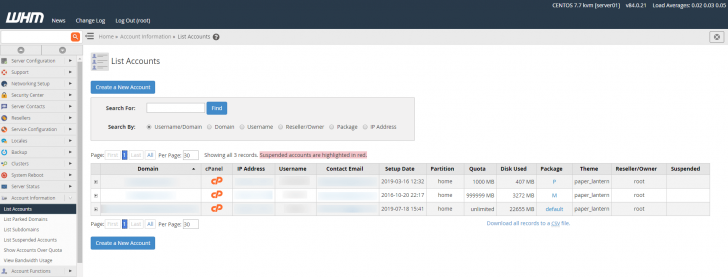
To access an account’s cPanel, simply click on the “cP” icon in the cPanel column. This eliminates the need for passwords for the WHM user, allowing easy access to any cPanel accounts on the server.

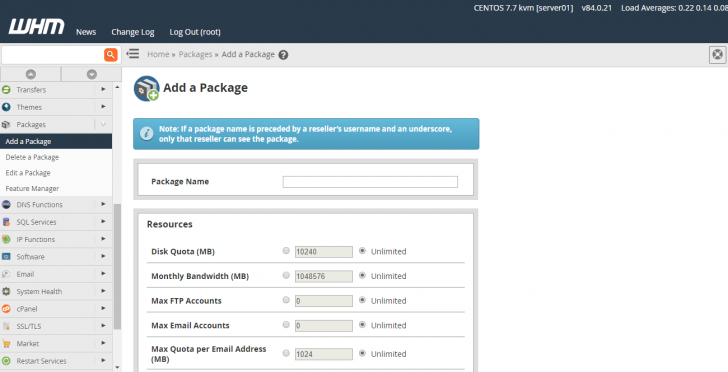
To open a new hosting account, choose the Create a New Account option from the account list header. For account creation, a hosting package is required, which sets limits on disk space, monthly data transfer, email account numbers, and other factors. This feature is particularly beneficial for resellers or agencies managing multiple client accounts on one server.
To create a new hosting package, go to the Packages section and select Add a Package. If no package exists, WHM will set up the new account using the default package with unlimited features.
Customizing the cPanel interface
The images display the default WHM/cPanel layout, but it can be personalized with the company’s name, logo, and a unique style. Customization choices can be found in the cPanel section of the side menu.
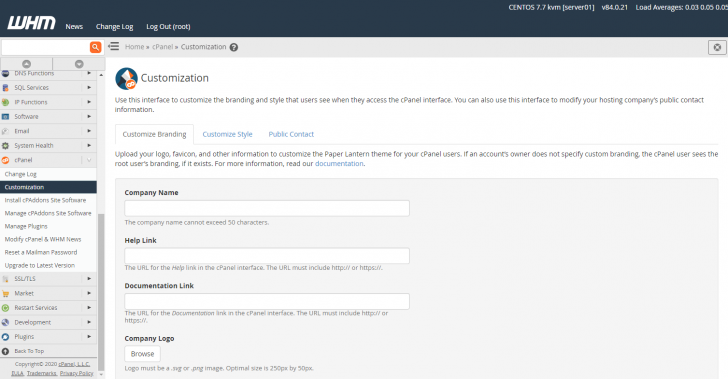
Other fundamental themes for cPanel are also accessible within the panel, in addition to the basic interface shown in these examples. Users have the option to select from dark, light, and retro themes.

chsyys/FreePik
SSL Certificate Issuance and Administration
The WHM panel provides full control over SSL certificates for all domains on the server, including those in cPanel hosting accounts. It enables the installation of SSL certificates from third parties and the automatic generation of new ones, with default suppliers like Let’s Encrypt and cPanel by Sectigo.
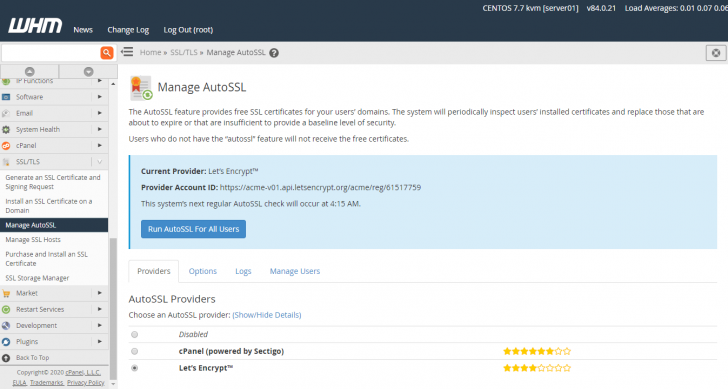
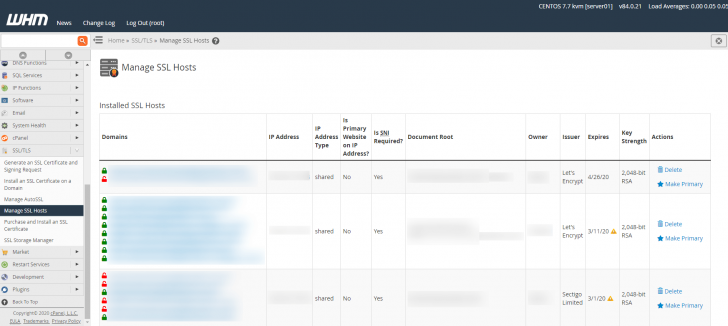
Hosts can see all current domains and subdomains on the server along with the SSL certificate status for each in the Manage SSL tab.
Backups stored on WHM
WHM offers a comprehensive backup section with various configuration options, allowing you to schedule automatic backups at your preferred intervals, select specific cPanel accounts to include, and customize how SQL databases are handled. These features can be found in the Backup Configuration tab in the side menu.
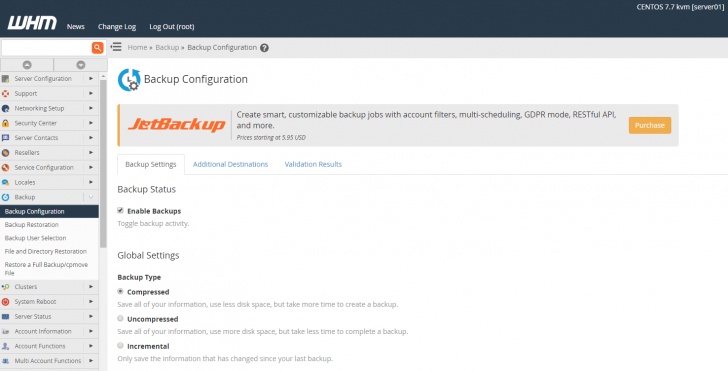
Sending backups to an external server is strongly advised as it ensures that backups remain secure in a different location in case of any server or disk malfunctions.
After backing up your data, you have the option to transfer the backup file to a different server through various protocols such as Rsync, FTP, and SFTP. Alternatively, Google Drive or an Amazon S3 instance can also be utilized for this purpose. Once set up, this automated process occurs after each backup.
chsyys/Flickr

Server observation
WHM offers extensive server monitoring features, allowing users to designate particular services for monitoring. The dashboard displays the status of these services under the Service Status section. To aid in problem-solving, WHM administrators can establish alerts via various channels like email and SMS to receive notifications when a service is inactive. Additionally, users can configure other notification settings, such as SSL certificate expiration, cPanel account suspension, and surpassing email sending limits.

The dashboard provides access to the Apache web server status, daily process log, and CPU usage information. Users can view stored logs and track historical data to detect any irregularities in CPU usage and their causes.
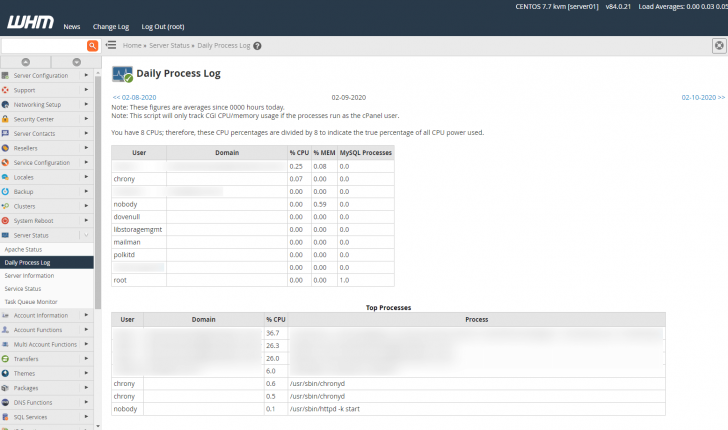
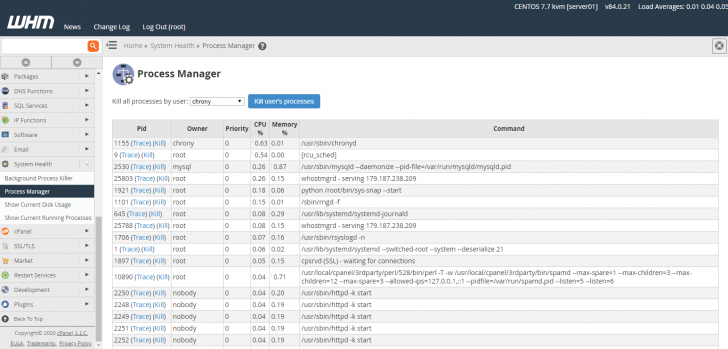
The System Health section allows you to monitor the system’s status, view all current processes on the server, and terminate them using the panel without needing to access the terminal.
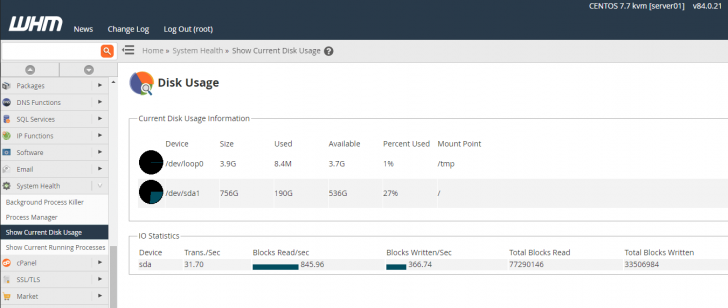
The storage disk usage report is also accessible in this portion.
Obtaining WHM can be achieved by following these steps.
WHM is a paid software, therefore it cannot be directly installed on a server. It can be acquired either by buying a license or through a hosting provider.
WHM licenses are priced at $15 per month for a single installation, with costs decreasing for hosting companies based on the number of installations. Acquiring licenses is the most favorable choice for hosting firms and is essential for those using servers with unmanaged root access. Explore the range of available licenses on offer.
Resellers, agencies, internet professionals, and others should opt for a hosting plan that includes the WHM panel, with the service provider covering the license fee. Larger companies with numerous clients pay a higher price for each individual license.
Shared hosting plans often include cPanel as a control panel, but WHM is typically not available in these cases due to resource limitations.
To discover hosting packages that utilize WHM, look for advanced services like Reseller, VPS, Cloud, and Dedicated Server. Keep in mind that the extent of WHM privileges can differ depending on the selected plan. Full server customization is only possible with WHM root access, which is typically unavailable in shared Reseller plans but offered in more robust VPS and Dedicated plans.
Conclusion
WHM is a robust control panel for overseeing hosting servers, ideal for individuals looking to resell hosting services or manage more advanced options like VPS and dedicated servers.
Check out the most affordable options for Private Virtual Servers (VPS), Hosting Resale, and Dedicated Servers that include WHM in the service package, and take advantage of our special discounts before making a purchase. 😉
Leave a comment if you have any inquiries, and I will be happy to assist you!
Publication date: 12/02/2020 (last updated 02/02/2024)
Concepts are labeled with tags.