



In a more interconnected digital world, we encounter new challenges when accessing resources globally that we would not have faced when accessing information locally.
Have you observed the extended time it takes to establish a connection or successfully deliver a message to someone residing far from Brazil?
Can you tell if there is a variation in response time compared to someone located a short distance from you?
Today’s post will focus on the time gap between a server request and response.
Punctuality is crucial when selecting a quality hosting service as it can determine users’ experience with your digital solution.
What does latency refer to?
What is latency?
Latency refers to the time it takes for a signal or data package to travel from one computer to another.
If we were to draw a simple analogy, the internet can be likened to a pipe with a user’s computer at one end and a server at the other end. Latency refers to the time it takes for the information (water) to flow from one side of the pipe to the other.
The longer the pipe, the greater the delay in transmitting information from one side to the other. To determine this latency, we must calculate the internet (or water) speed and pipe size.
We are focusing on measuring the speed of light, not the speed of wind or sound.
Latency is constrained by the speed of light, which is consistently 299,792,458 meters per second in a vacuum. However, additional calculations are required on Earth due to our presence here rather than in space.
If we claim to have a latency of 20 ms, it means the source and destination are as far apart as 3,000 kilometers or 1,860 miles in a vacuum. It is impossible to improve upon this without changing the laws of physics.
These 20 milliseconds indicate an average distance of 2,227 km that our data packages cover as they pass through optical fibers, resulting in a radius of 1,260 miles.
A real-life situation
How does it function in real life when we visit a website and perceive a delay due to latency?
Various factors impact a website’s loading speed, such as optimization, programming, caching, file size, and server location latency.
Let’s consider a compelling situation to grasp this idea.
If your website is hosted in Australia and you plan to make it accessible to users in Brazil, it could lead to cost savings by using a more reliable server.
Have you considered the route of the data requested by your website users in Brazil?
It would clearly be significantly larger than if it were located in São Paulo.
The route goes through Brazil, passes through underground fiber optic cables to Europe, through Asia, then underground cables again, before reaching Oceania.
Upon arrival in Australia, the server response time processes the requested information and sends it back through the same path to the user in Brazil. It’s like traveling back around the world, isn’t it?
What might appear to be inexpensive could end up being very costly depending on your objective.
What sets apart latency from bandwidth?
When discussing server latency, many people mistakenly believe that increasing bandwidth will reduce latency. This is incorrect, and I will explain why.
Let’s revisit the “cano” illustration.
Simply purchasing a wider pipe does not result in faster water flow; instead, it allows for a greater volume of water to pass through at the same speed between two points.
Bandwidth represents the width of the pipe and determines the amount of information a server can transmit simultaneously at the speed of light. Conversely, latency is the time it takes to send data to the user, dependent on the distance traveled rather than the quantity transmitted.
What is included
Some factors can further impact the latency of your server. Let’s discuss some key ones.
Domain Name System
We must distinguish between the hosting server and the DNS server. If you have some understanding of technology and have created a website before, you know that a server is identified by an IP address and is associated with a domain name, allowing access to resources through the domain name rather than the IP address.
Your DNS and website could potentially be hosted on separate servers, which can impact the response time or latency of your site.
When you enter www.Nanodositis.com.br in your browser, the request is sent to the nearest DNS server, which then directs it to the server hosting the website. DNS servers are located worldwide to handle such requests.
Therefore, it is important to take into account the period of “research” by DNS, or “DNS lookup,” when assessing a website’s latency.
Hosting services
Hosting location significantly impacts latency. To ensure consistent performance worldwide, consider using a CDN with multiple nodes to maintain stable latency levels regardless of user location.
Internet service provider
A factor that many overlook but can significantly impact access speed is latency. Slow connection speeds can result in high latency, causing a decrease in the number of data packages transmitted and affecting transmission quality. Switching internet providers or upgrading to a larger data package may improve website access quality in such situations.
Encryption for security purposes
When using the internet, it is common knowledge that ensuring security is essential. To enhance security while browsing with the HTTP protocol, it is advisable to encrypt data transmission between the client and server using protocols like TLS and SSL.
Until that time, everything is going well. A secure website is ideal for your users and also contributes to the perception of “quality,” potentially enhancing their sense of value.
Why does this encryption have a direct impact on latency, affecting response time and adding an extra layer of security?
Encryption over HTTP, also known as HTTPS, involves extra data transmissions due to browser checks to verify the authenticity of the site before encrypting and sending the data, which can impact connection speed.
We saw significant improvements in loading speed for encrypted connections with the introduction of the HTTP/2 protocol. This version is binary instead of textual like the old HTTP, and it allows for multiple requests on a single connection, known as “multiplexing,” resulting in better performance overall.
Latency and user satisfaction
Will we collect all the information provided and imagine what a user’s experience might be like while accessing a digital solution with poor latency?
Examine the given situation, a typical practice for websites.
- Hosting: server situated in the United States.
- The DNS base is distributed and relies on the nearest access location available from the provider, so we will consider it to be closest to Florianópolis.
- Internet provider: Mobile phone technology known as 3G.
- Location Access: Florianópolis.
Here we are not considering the website’s optimization quality and loading speed.
Can you envision the journey that this “data” will undertake?
Ask for something
Florianópolis is connected to the United States via a DNS network.
Response
USA is greater than DNS in Florianópolis.
Imagine all of this distance being covered using a 3G cellular connection.
How much time do you anticipate the user will need to reach the website in Florianópolis?
Latency of more than 8 seconds can hinder planned marketing efforts and impact user experience when accessing digital solutions.
Measuring latency explained
Thanks to kind individuals who prioritize quality, there are free online tools available that assist in identifying delays in the latency of our resources.
Pingdom is a prime illustration. The company focuses on monitoring performance and availability for websites, applications, and servers, offering valuable paid solutions for agencies and developers requiring ongoing internet service monitoring.
The tool allows testing from various regions in the USA, Sweden, and Australia in free mode, displaying the average response time in seconds to assess user performance. Paid mode offers additional locations, such as Brazil (São Paulo and Rio de Janeiro).

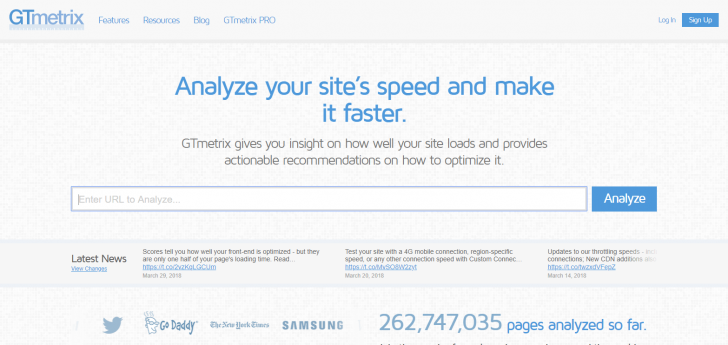
GTMetrix is another useful tool that focuses on site performance and provides a latency parameter. The report it generates is comprehensive and completely free, with no paid sections to access the full report.
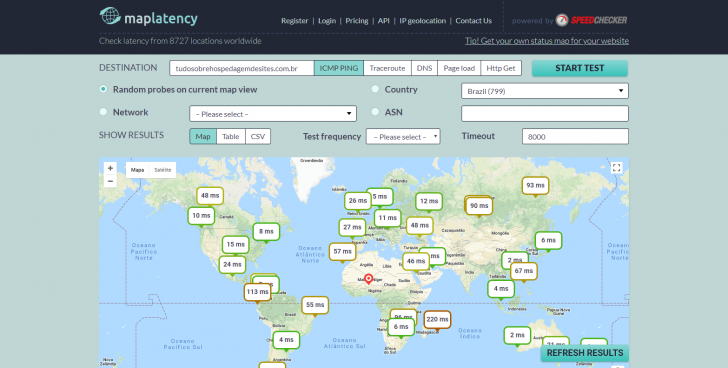
One tool that combines server performance and latency is MapLatency, which provides various filters such as network, country, test frequency, DNS response time, and ping response time.
MapLatency displays latency on a map across different global regions, allowing users to see the online resource access experiences of people worldwide. However, one downside is that registration is required to conduct additional tests, and the tool operates on a freemium model with paid features.
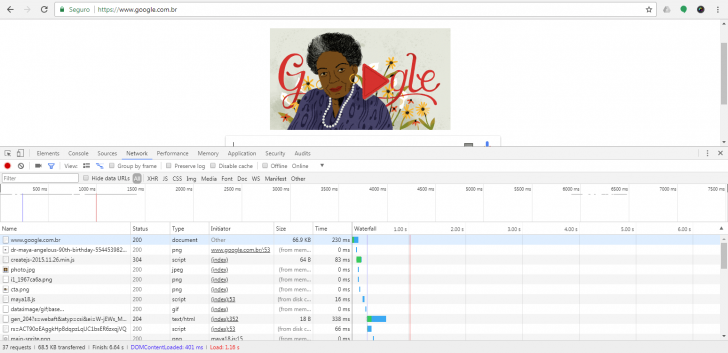
There is a feature in Chrome browser called the Network tab that can help you identify latency in internet technology development. To access the report, open Chrome developer tools, go to the Network tab, and reload the page.
The function will show the sequential loading of site features, indicating the loading time for each one (and potential delays in making them accessible).
What is the effect?
The test frequently reveals the true nature of using our digital tools. It informs us about potential outcomes and their impacts.
Response time exceeding 5 seconds
Alert should be raised to identify the cause of delays in your digital solution, especially considering the 3-second loading rule in digital marketing. Delayed loading can lead to significant traffic loss and potential negative impact on the site’s reputation.
Network connection velocity
Your network might be causing issues currently, so it’s important to check if the delay is due to your internet connection or the specific feature you are attempting to access.
Server Response Time
Is the server performing poorly in its response time? If so, it is advisable to sound the alert. Shared hosting or DDoS attacks can lead to slower user experiences. Monitor this issue regularly and explore options like relocating your site to a different server or service if necessary.
Domain Name System
Your internet provider in your area often offers a distributed database, which allows for more localized access from the actual hosting location of the DNS. This may cause latency times to differ depending on this service.
It is worth examining how this metric performs for your website by using a helpful tool called DNS Hosting Speed. Follow the link provided to test the latency of your domain’s DNS.
Summary
We discussed various methods to gauge your server’s latency and identify its primary causes in the previous post.
Did you enjoy our post? Share it with your friends and coworkers.
Any inquiries? Feel free to leave a comment, and we will be happy to respond to you.
Published on April 4th, 2018.