



When it comes to the internet, everyone acknowledges its ability to benefit business, regardless of size. Even less tech-savvy entrepreneurs understand the significance of having an online presence in today’s world.
Small Brazilian companies face difficulties establishing an online presence, as indicated by statistics showing that 48% of them do not have a website, according to a survey conducted by Cetic.br.
A hurdle for small businesses wanting to establish an online presence, such as creating a website, has become easier with the emergence of various online solutions like Google My Business. This free tool enables businesses to have an online presence on Google at no cost.
I will explain how this no-cost Google platform operates and the advantages it offers for your business. Ready?
Google My Business Overview
When you search for a company on Google, the information displayed on the right side, such as photos, address, map, and reviews, is provided by Google My Business. For instance, you can see this in the search results for the Museum of Tomorrow in Rio de Janeiro.
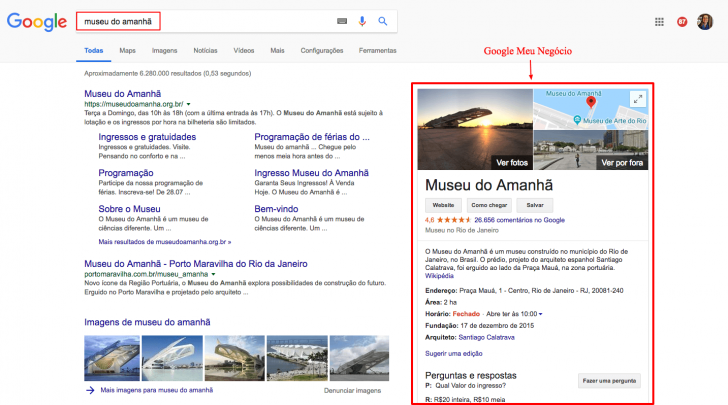
Registering your business is all it takes to appear on Google like that.
Google My Business is a free tool designed for businesses of all sizes to register on the platform. This allows users to easily find the company on Google and Google Maps.
You do not need a brick-and-mortar store to utilize the platform. Businesses can sign up and decide whether or not to display their address.
What are the benefits of utilizing Google My Business?
Registering on Google My Business offers numerous advantages with no associated costs. Discover the primary reasons for listing your business on this platform.
Appear readily on Google
By registering your business using Google My Business, your company will stand out in search results on Google Search and Google Maps, making it easier for users to find you.
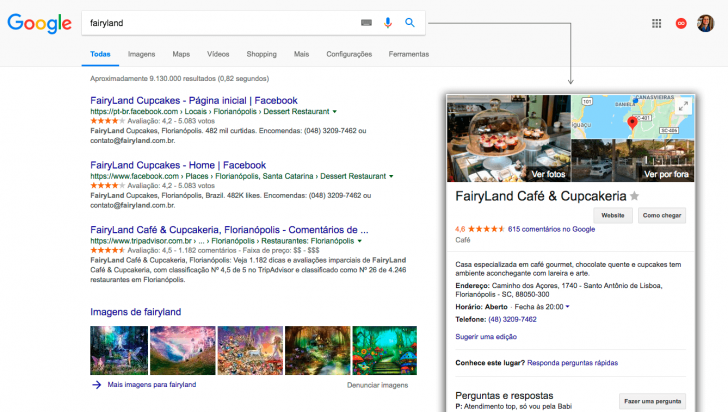
Even if you already have a website, it is beneficial to sign up on the platform to enhance your visibility to searchers and make it easier for users to engage with your business. By registering, users can easily access information like your address, phone number, and business hours with a simple click.
I’m a fan of a particular coffee shop, and you just looked up the name on Google to find information about it.
Attract fresh clientele
When signing up, provide detailed information about your business, include appealing images, and engage users to generate interest in visiting. A thorough and informative page can attract new customers. Additionally, consider offering a 360-degree virtual tour for customers to explore your business remotely.
The initial impression is crucial, especially now that it begins online.

Build trust with customer evaluation.
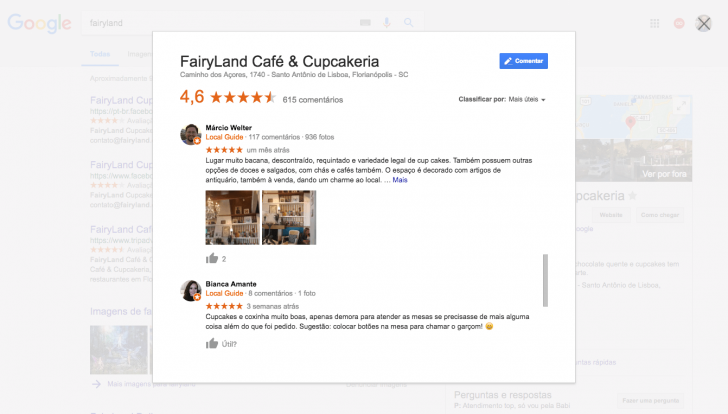
Users can research destinations online before visiting them. Using Google My Business can help companies with happy customers grow their reputation and attract more clients through customer reviews.
Even when receiving negative feedback, it provides a chance to engage and demonstrate the company’s concern for customer satisfaction.
Google My Business Tools
The platform offers a wide range of features, starting from basic business registration to website publication, all at no cost. Discover the possibilities available on Google My Business for free.
Register your business on the platform
The simplest method to utilize Google My Business involves enrolling your business in the platform. By providing details like the business name, address, and category, your business can appear in Google searches and Google Maps.
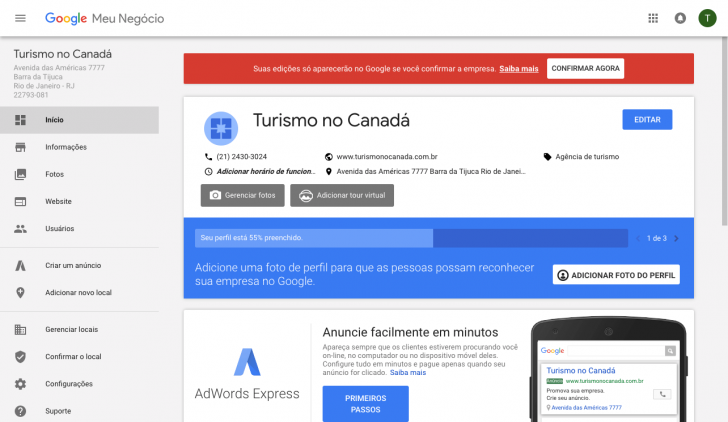
To increase visibility, you can enhance your profile by adding images of your business and including additional information like contact details and business hours. You can respond to customer feedback directly through the dashboard.
Any company can access this standard registration for free, and we suggest enhancing your business’s exposure even if you already possess a blog or website.
I created a sample record on the platform for a made-up company called “Tourism in Canada.”
Make a basic website for free.
After registering with Google My Business, you can quickly and easily generate a basic website for free using the tool. This website is automatically created based on the information you provided during registration. You have the option to personalize it by selecting from various preset styles and adding additional details about your business.
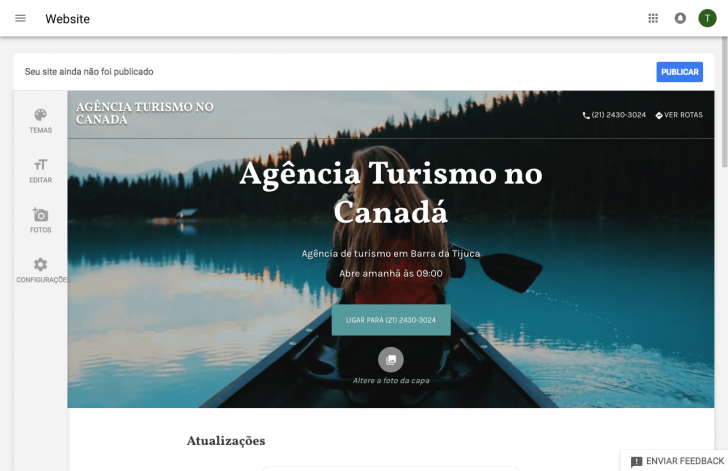
Creating websites in the Google My Business tool has several key points to consider.
- The website is compatible with all devices, allowing all internet users to access it, whether they are using smartphones, tablets, or computers.
- You can make changes to the website using either a computer or a mobile device, and both options are effective.
- You have the choice to use either a custom domain on your website or a free address offered by Google. With the first option, you can either register a domain through Google or utilize one registered with another company at no additional charge.
- The website is automatically kept up to date based on the data from Google’s land registry map, saving time on site management.
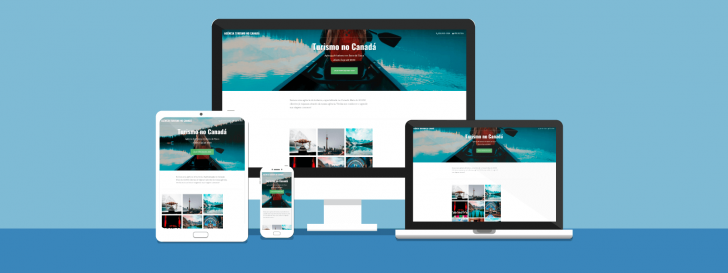
The tool enables any business owner to enhance their online visibility on Google with a basic and free website.
It is an excellent resource for business owners without a website or the means to create one independently. Individuals seeking a free tool with additional capabilities can opt to build a website on Google Sites or explore alternative options for creating a cost-free website.
Post on a consistent basis.
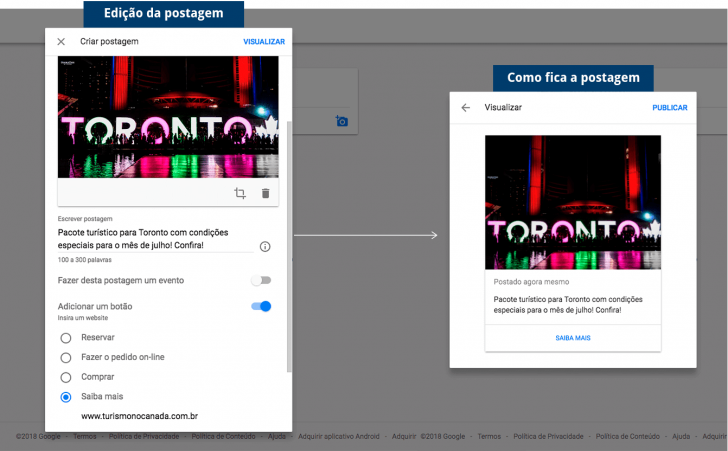
The posting tool is a new addition to Google My Business that allows you to share updates with users who discover your company on Google, such as events, news, and promotions.
Each post includes a main image, a brief text of no more than 300 words, and a call-to-action button for activities such as booking, ordering online, purchasing, or obtaining further information via a linked website. This feature serves as an additional means to engage with individuals who have come across your brand and entice them to explore your offerings further.
Discover how people are discovering your business
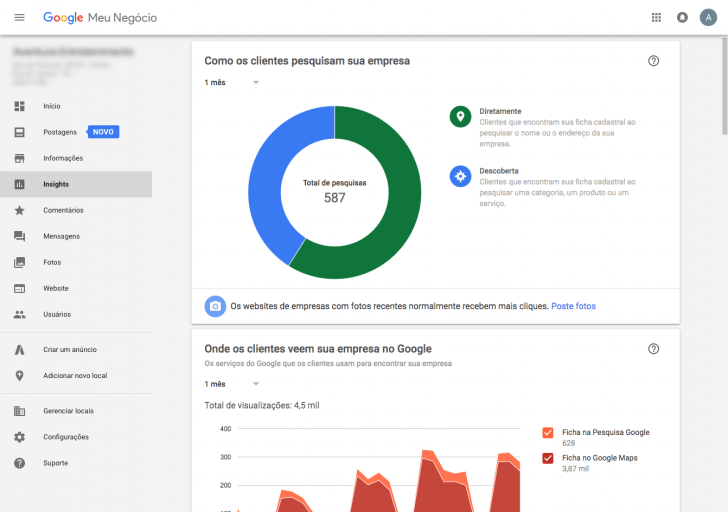
The “Insights” feature in the tool displays how individuals discover your business on Google by using your Google My Business subscription. It provides details such as:
- Users discovered their business either by directly searching for their name or address, or indirectly while looking for a specific category, product, or service.
- Where customers have discovered your business – either through Google Search or Google Maps.
- What did users do when they checked their company record – visited their website, clicked on or viewed the directions to reach the business.
Creating a website using Google My Business
Let’s explore how simple it is to build a free website using this Google tool, which can be done in just a few minutes now that you are familiar with it.
Register for My Google Business by completing Step 1.
To utilize any of the aforementioned functions, you must have a Google My Business account. To set one up, visit the platform and select “Start Now.”
If you have utilized Google Places for businesses or Google+ Pages before, your account has been transitioned to the updated platform with all the previously provided information.
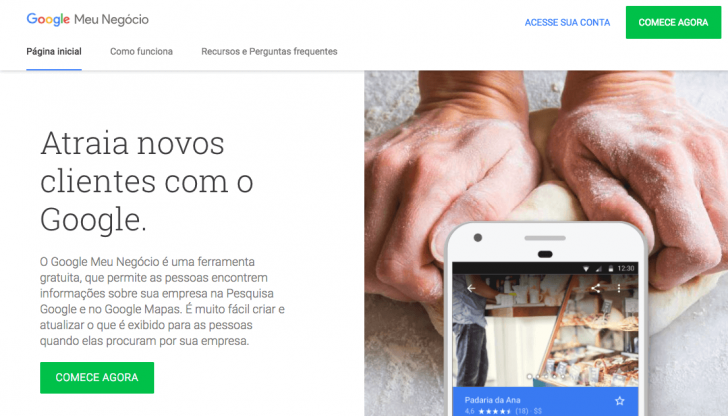
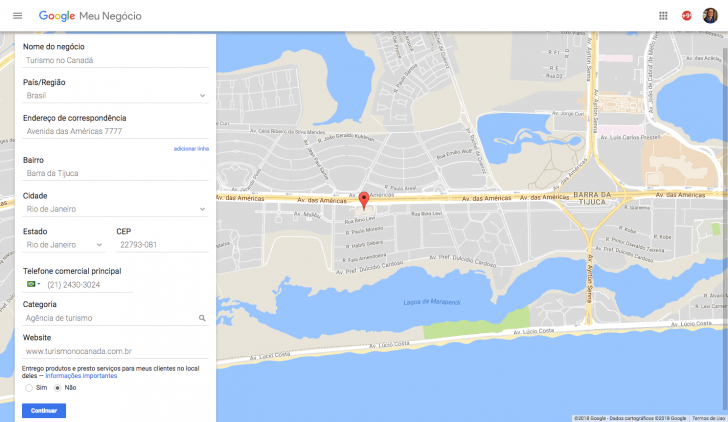
Enter the details of your business in Step 2.
Complete the form with your company’s essential details, including its name, address, phone number (if desired), and business category. Service providers operating at customers’ locations have the option to keep this information private in the directory. Upon completion, verify and validate the information to ensure your registration appears on Google.
Validation for your company record to appear on Google can be completed promptly through phone or email, or at a later time.
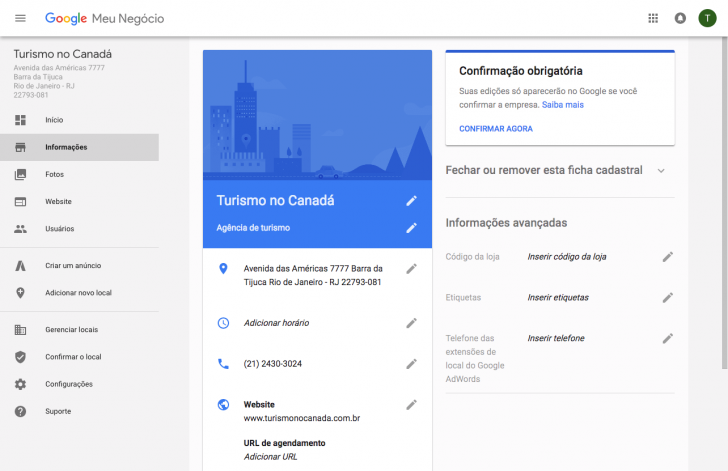
Enter additional details and images of your business in step 3.
Once you enter the Google My Business dashboard, you can utilize all its functions and finalize your registration by providing relevant details such as uploading images of your business and specifying operating hours for your customers.
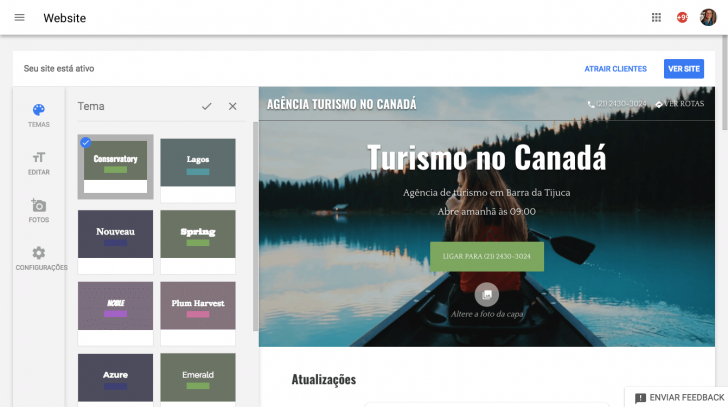
Create your Google site automatically in Step 4.
Click on “Website” in the Google My Business dashboard to generate a free site through Google. The tool will automatically develop a website using the details provided during registration.
You have the option to make some modifications before posting, although they are not extensive. You can choose a visual theme that best fits your business and input additional details on the website.
Publish your website in Step 5.
Clicking publish indicates satisfaction, and then the final step is selecting a virtual address for site accessibility, offering two choices.
Option 1 involves utilizing a complimentary subdomain provided by Google that resembles the format of “company.business.website.” Your company name would appear before the first period as “negocio” and “site” cannot be altered, as it is Google’s domain.
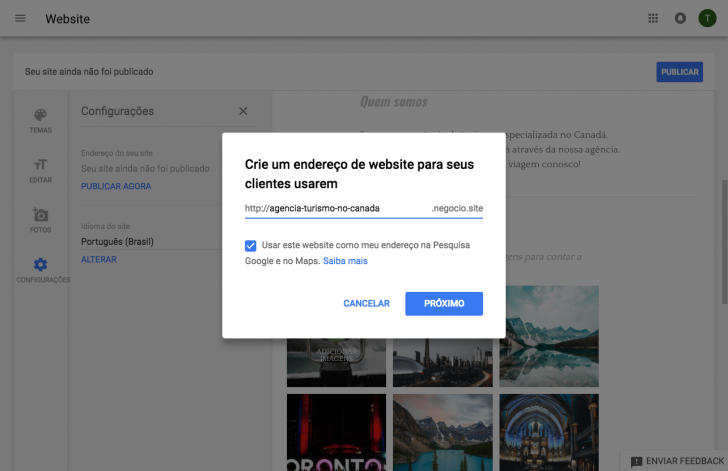
Use a custom domain, such as “joaocompany.com,” that is paid for. You can purchase it directly through Google Domains or use a domain from a different registrar.
Google Domains is convenient to use, but it does not offer .br domains and its registration fees are not the most affordable. For cost-effective options, consider looking at our list of top domain registration companies.
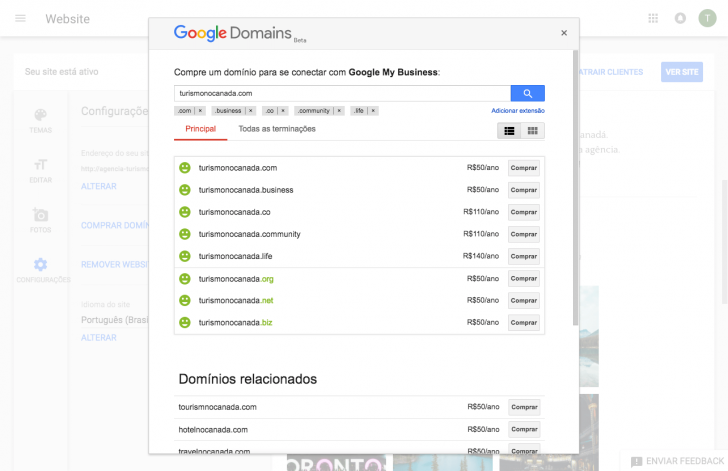
If your domain is registered elsewhere other than Google Domains, you will have to redirect it. Google provides instructions on how to carry out this process in this support article.
You can change the address of your Google site at any time, whether for a custom domain or a different free Google subdomain. If you have a site published on another domain, you can choose which site visitors will see.
Find out in this article why choosing a custom domain for your business is recommended if you are unsure about which address to use.
Outcomes
It is now time to view your website online once you have selected your domain and published it. If you have chosen a free Google address, it will appear automatically. However, for custom addresses, it may take up to 72 hours for it to be visible due to domain propagation time on the internet.
Conclusion
Visibility on Google is crucial for establishing an online presence in a competitive environment such as the internet.
Google My Business provides numerous benefits to business owners of all sizes. It allows companies with websites to engage with users and enhance their visibility on Google.
Consider expanding your business by investing in a professional website. Check out this link to compare top website builders recommended by our team.
Succeed in your business endeavors and feel free to ask any questions by leaving a comment! 😊
Published on 23/01/2018 with revisions made on 17/07/2020.
Google tutorials are labeled with tags.