


chsyys/DepositPhotos
Google Workspace, developed by Google, is our top choice for professional email services. It offers a comprehensive suite of online communication tools and is also available for non-profit organizations as part of a special initiative.
Google Workspace is provided at no cost to Brazilian NGOs as part of the Google for Nonprofits program, which has been available in the country since 2015.
Google provides various free resources for non-profit organizations, such as Google Workspace, AdWords, and Youtube Premium. The focus will be on Google Workspace, which is seen as a key component of the program.
Next, discover more about the tool, its advantages for NGOs, and how to obtain complimentary access for your organization.
What does Google Workspace entail?
Google Workspace, an online communication application suite developed by Google, was originally known as Google Apps when it launched in 2006. Chances are, you are already using these apps, or ones similar to them, in your personal or professional life.
Top applications for Google Workspace
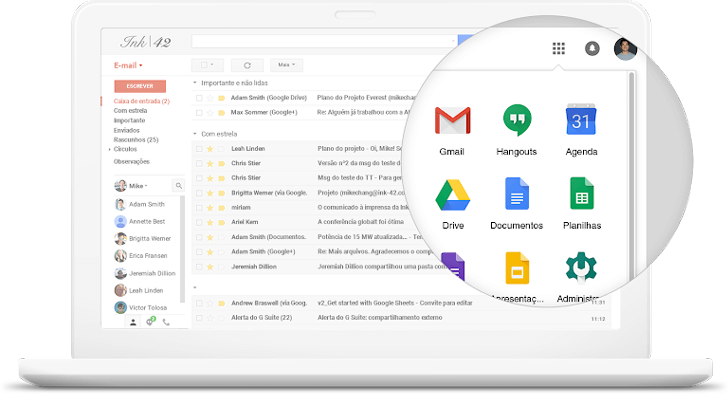
Google Workspace for non-profit organizations includes several helpful apps suitable for any organization, regardless of its size or industry.
Communication applications such as Gmail, Google Calendar, and Hangouts offer various functions like email services, scheduling, and video chatting. Gmail and Google Calendar provide professional features that are not available in their personal versions, while Hangouts is similar to Skype in functionality.
Google Workspace offers tools for making various types of documents that can be shared with others for viewing, commenting, and editing, similar to Microsoft Office’s online version.
Storing and sharing files is now commonly done using online solutions like Drive, which offer enhanced security and the convenience of cloud storage for accessing files from any device and sharing them with others.
There are additional advanced security and control options available in higher-tier Google Workspace plans that are not part of the free plan for NGOs. Check out a review for more in-depth information on Google Workspace.
Gmail or Google Workspace? Which option should you choose? Discover here!
NGOs are eligible for free features in the Google Workspace plan.
Google Workspace for non-profit organizations offers complimentary access to the Basic plan, which is set up within the organization’s domain. A domain is a personalized internet address, such as google.com.br, commonly used for professional websites and emails. Typically, a domain costs around R $ 40 per year and can be obtained from different domain registration firms.
I suggest checking out this comprehensive article on registering domains for NGOs if your organization does not have one yet.
This Google Workspace Basic plan may be the most fundamental option, but it is quite powerful and typically sufficient for most needs. It is priced at $6 per user per month, which suggests it offers substantial value.
Explore the key attributes of Google Workspace Basic.
- Gmail for business enables custom domain usage and ad-free experience.
- Calendar, Instant Message (Hangouts), and Document Applications including text, spreadsheets, presentations, and websites.
- Storage and sharing files using Google Drive.
- Each user is allowed 30 GB of storage for Gmail and Drive.
- Access on various devices such as computers, smartphones, or tablets.
- Accessible even without an internet connection.
- Compatible with Microsoft Office software.
- Centralized control panel.
- Assistance is available around the clock, every day of the week, via phone, email, and online.
To see all the Google Workspace features and compare different versions, including the paid ones, visit this Google page. If you decide to upgrade to a paid version, you can click here to start a 14-day free trial.
What are the benefits of using Google Workspace for non-profit organizations?
When using Google Workspace in a non-profit organization, I see only advantages. This is because no matter the organization’s size, it will likely utilize at least one of the tools available in Google Workspace.
One major benefit is having access to a powerful tool that many companies and professionals pay for, even if you don’t utilize all Google Workspace features.
Your NGO should have sufficient resources if its staff members engage in any of the listed activities.
- They make use of email, even if it is a basic account such as Gmail.
- They utilize a schedule, whether physical or digital, to note important appointments and dates.
- Generate and distribute documents, such as presentations for donors and volunteers, monthly budgets, or internal reports.
- Store and distribute various files like spreadsheets, reports, images, videos, and other content with others.
- They utilize various forms of media such as chat and video for conducting meetings and keeping employees, volunteers, and partners updated.
- Consider maintaining or establishing a website for non-profit organizations, even if it is free of charge.
All these functions can be accessed in Google Workspace at no cost for your NGO. Without any environmental impact, commitment, or time limit. Therefore, why not utilize the top email tool available today if it’s essential and doesn’t cost anything?
Google Workspace offers advantages for non-profit organizations.
Even if your organization currently utilizes other free services for these tasks, Google Workspace will provide additional advantages that your current solutions may lack.
Enhanced trustworthiness and expertise
You can make personalized email addresses with Google Workspace by using your own domain, which is more professional than using a free email address like Gmail.
Google Workspace for non-profit organizations provides unlimited email accounts, each with 30GB of storage. This allows for the creation of multiple email accounts for different departments or employees, rather than relying on a single account for all communication. Additionally, the storage space is significantly larger than that offered by free alternatives.
Improved organization and enhanced security
By setting up your Google Workspace account, all applications remain linked to your specific domain. This ensures that email accounts, documents, calendars, discussions, and all other content are connected to the relevant domain, making organization easier.
This setup offers increased security by preventing data loss when an employee departs from the organization. It is a common occurrence for individuals to leave with email account credentials that nobody else possesses. Centralized administration ensures that no documents or emails are lost in such situations.
More characteristics and incorporation
Google Workspace is a comprehensive application suite that offers storage, communication, collaboration, and management tools all in one account for easier administration and use compared to separate solutions.
Users can access the apps across various devices and even without an Internet connection, enabling offline work when needed.
Google Workspace users for non-profit organizations receive the same around-the-clock technical support as paid users, accessible via phone and email. The assistance provided has been consistently excellent in my experience, and there is abundant online help material available from Google.
Who is eligible to use Google Workspace for non-profit organizations?
Non-profit organizations can receive complimentary access to Google Workspace through the Google program.
- Private groups or foundations can have designations such as Organization of the Civil Society of Public Interest (OSCIP), Federal Public Utility Entity (UPF), or Social Organization (OS). They can also be Beneficent Social Assistance Entities with a CEBAS Certificate.
- The organization known as OSCIP stands for Organization of the Civil Society of Public Interest.
- Federal Public Utility Entity – UPF (find more information about UPF on this Wikipedia page).
- Social Organization – OS (find more information about OS on this Wikipedia article)
- Entity of Social Assistance with CEBAS Certificate that is benevolent.
- Non-profit organization that serves the public interest.
- The Civil Society Organization of Public Interest (OSCIP) is structured according to the information provided in the Sebrae article.
- Federal Public Utility Entity – UPF (find information about UPF on this Wikipedia link).
- Social Organization – OS (discover more about OS on this Wikipedia page)
- Entity of Social Assistance with CEBAS Certificate that provides aid.
The organization needs to be enrolled in TechSoup Brasil, which verifies and approves institutions in the program. This registration is complimentary and can be completed before or simultaneously with the request for a Google account. Further details will be provided later.
Entities that do not meet the requirements for this program:
- Government agencies or groups.
- Healthcare facilities or medical institutions;
- Educational institutions such as schools, nurseries, and universities, including those involved in philanthropic activities, are eligible.
Creating a Google account for non-profit organizations
To use Google Workspace at no cost, you must have a nonprofit organization account with Google. After signing up, you can activate Google Workspace and other necessary applications.
The simplified process for setting up the account is outlined in steps.
- Register your user and organization with TechSoup Brasil’s website, which is in charge of verifying institutions in the program. Submit your entity’s documentation (Statute and CNPJ obtained from the Revenue website). Additionally, you may choose to register along with a Google account request for non-profit organizations.
- TechSoup will take up to 5 business days to validate your organization’s registration. After approval, there is a 24-hour waiting period before you can register on Google for non-profit organizations. These instructions come directly from TechSoup.
- Sign up for a Google account on the website designated for non-profit organizations, and feel free to utilize an existing Google account if preferred. Additionally, if you are already registered with TechSoup, enter the verification code during this step.
- Wait until you receive an email confirming the verification and validation of your non-profit organization.
- Activate your Google account and begin utilizing the necessary products. Access this Google link for a fast start guide tailored to non-profit organizations.
End of the text
The procedure to gain free access to Google Workspace is quick and straightforward, requiring only the non-profit organization to be officially registered in the country and to possess a domain for Google account setup.
I suggest that your non-governmental organization (NGO) should register a domain with the .org.br extension, which is specifically for non-profit NGOs in Brazil. Other options include .org and .ong.br, which serve a similar purpose but do not need supporting documents. You can find and compare the top companies for domain registration through this link.
If your organization has not been included for any reason, don’t feel disheartened. Find out in this guide how to make a complimentary email account on the Zoho platform and achieve great success! 🙂
Published on 08/05/2019 and revised on 16/06/2023.
Tags associated with Google include Google Workspace.