

Wix is a widely used website builder, selected by more than 100 million users worldwide. Despite its many years in existence, the platform continues to grow and offer simpler methods for website creation.
It is easy to feel uncertain about which option to choose when building a Wix site due to the numerous choices available. This article will compare the two options, Wix Editor and ADI Wix, to help you make the best decision.
Featuring: Wix’s ADI Editor
Let’s first learn more about each of the tools before beginning the comparisons.
What does ADI Wix mean?
chsyys/UnPlash
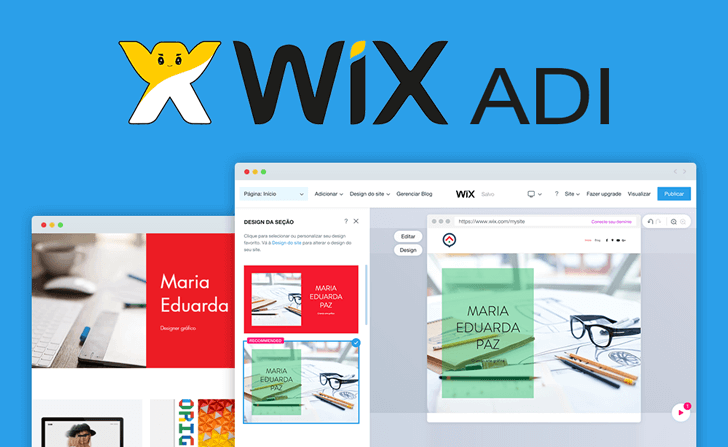
Wix ADI is an artificial intelligence design tool by Wix that builds a personalized website quickly using basic user input. Developed by Wix in 2016, ADI is a free feature accessible to all users.
What does the Wix Editor refer to?
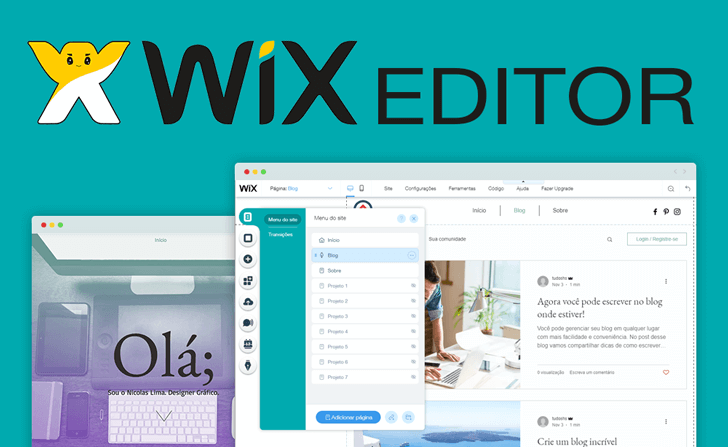
The Wix Editor is the most advanced version of the Wix website creation tool, where users begin by choosing a template and then personalize the design and content using all the available features.
Which tool is recommended: Wix Editor or Wix ADI?
The effectiveness of each tool depends on the specific requirements of individual users. Below is a summary to assist in determining the most suitable tool for each scenario.
Who should use ADI Wix?
ADI Wix is perfect for individuals seeking to effortlessly and automatically build a website. It caters to those looking to streamline the creation process while still achieving a distinctive website that aligns with their brand or desired style.
It is recommended to create “conventional” websites with a typical structure and features shared by many websites. This could involve a website consisting of 3 to 5 pages, such as an ‘About Us’ page, a page showcasing products and services, and a contact page. Standard features may include a contact form, blog, map, social media links, among others.
Who should use the Wix Editor
The Wix Editor is perfect for those looking to customize a template easily or for users seeking advanced editing capabilities.
Users who wish to build a website with a contemporary and appealing design can save time by utilizing the pre-designed templates offered by the Wix editor, which provides a wide selection of attractive options.
This choice is suitable for users with higher expectations who seek complete autonomy and control in their creative process. It is ideal for those in search of advanced website features, such as code editing through the Wix Code functionality.
Advantages and disadvantages of every tool
Each tool is best suited for specific needs or user profiles, resulting in both advantages and disadvantages outlined in the tables below.
Wix ADI
| Pros | Cons |
|---|---|
| It’s the easiest way to use Wix. It is much more intuitive and less technical. | It is more limited in resources. It has fewer customization options. |
| It’s easier to create a website with a unique look because it doesn’t use a template as a base. | There are few themes and the layout is seen only at the end of the process. The look of the site is beautiful, but simpler. |
| Information provided, such as address, phone and social networks are automatically entered on the site. | The tool is a bit heavier and can present slowness at some times. |
| Allows you to change the theme during the edition of the site and after its publication. | The theme exchange may deconfigure some elements of the site created earlier. |
| You can build a site on ADI Wix and then migrate it to the Wix Editor. | By using the Wix Editor and returning to the ADI, all information made in the Editor is lost. |
| It works as in other website creators, in which you edit the site by sections, from previously created options. | It offers less flexibility and freedom to create a website. No drag and drop function. |
| It features free virtual store apps, blog, chat and schedules. | There is little variety of apps to enter the site (only 4). |
Wix Editor
| Advantages | Disadvantages |
|---|---|
| Provides extensive features and customization possibilities. | More challenging to use with a steeper learning curve compared to ADI. |
| Allows for great flexibility and control in site creation, including drag and drop functionality. | Higher risk of disrupting layout or deviating from good design practices due to the level of freedom. |
| Offers a wide selection of templates for browsing and selection. | Changing templates significantly can be more time-consuming. |
| Enables selection of blank templates that closely match the desired website structure. | |
| Includes code editing feature (Wix Code) for advanced users. | |
| Provides access to numerous Wix and third-party applications, including over 100 free apps. |
ADI Wix versus Wix Editor comparison
Now that you have reviewed the key details of each tool, we will assess them based on particular queries.
Panel for Editing
Wix Editor
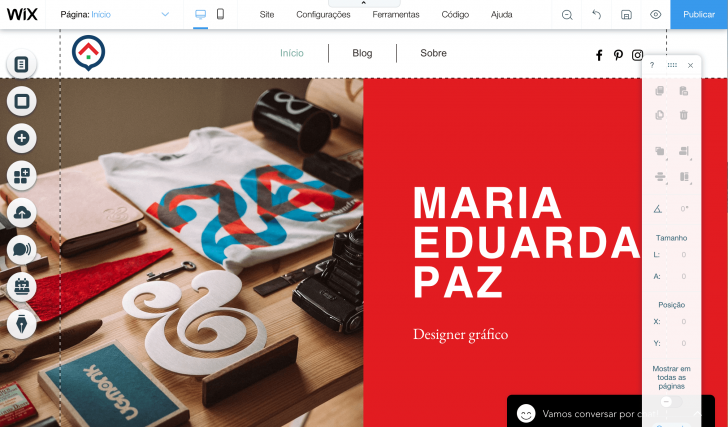
The Wix Editor panel provides users with a greater range of features compared to Wix ADI, allowing for more editing options. However, this may overwhelm users looking for a simpler tool.
Edits can be performed by selecting the website element or utilizing the menus accessible in the dashboard at all times.
Wix ADI
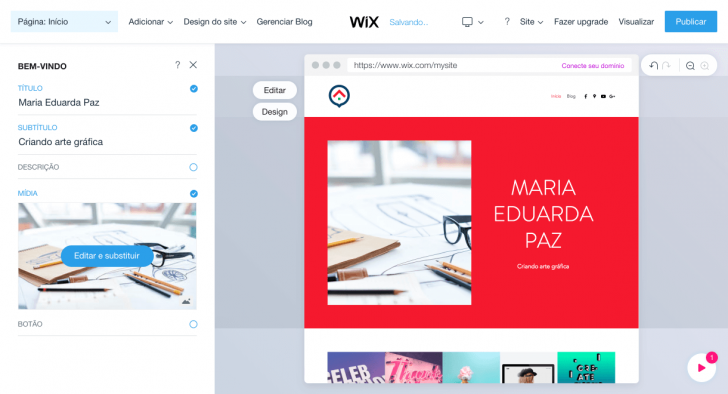
chsyys/ShutterStock
The ADI panel is designed to assist users by offering a clean interface that focuses on the site being created. Editing options are revealed when a section is selected for editing, ensuring users can concentrate on their editing tasks without distractions from excessive menus.
Templates and designs
Wix Editor
The Wix Editor provides a wide selection of templates for website creation, offering more options than ADI. Users can preview templates before selecting one, providing added reassurance during the site-building process.

The Editor’s templates are categorized based on the type of website, such as Business, Virtual Store, Restaurants, Portfolio and CV, Photography, and Design.
The Editor’s limitation in theme exchange, unlike ADI, requires users to stick with their chosen theme or create a new site on a different theme, making the process more cumbersome. This restriction is due to the significant differences between templates, making it challenging, if not impossible, to transfer content seamlessly to a completely different template.
Wix Artificial Design Intelligence
Wix ADI offers over 30 themes with descriptive names like “Chique,” “Classic,” and “Adorable,” each accompanied by a limited color palette, font, and creative description. For example, the theme “Fresco” is described as reminiscent of fresh-cut grass on a summer day. 🙂
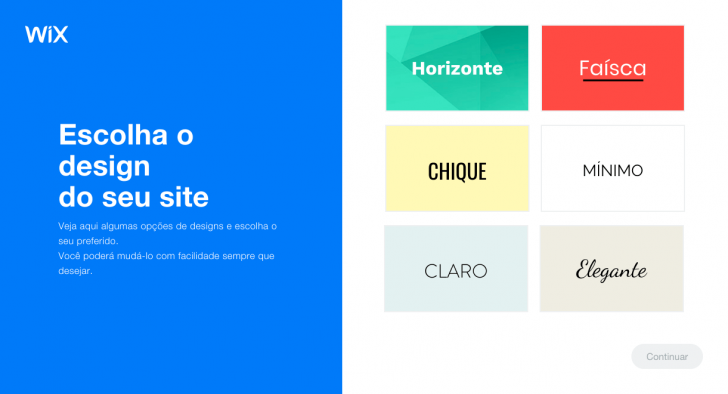
The absence of a preview image for the theme is uncommon in such tools, likely intended to simplify the creation process for beginners unfamiliar with website design.
The tool enables users to select a theme based on the image they wish to convey on their site, rather than analyzing and interpreting pre-existing templates, using terms like “classic” or “elegant”.
Wix ADI enables you to switch themes whenever you want, even after your site has been published, by utilizing a base structure.
Wix distinguishes between “themes” and “templates,” but they serve the same purpose of defining the site’s appearance.
Developing and customizing the website
Wix editor
Creating a website using the Wix Editor is straightforward. Once you select a theme, you can easily customize sections and content by using the editor. Drag and drop elements, add apps, pages, and more to personalize your site.
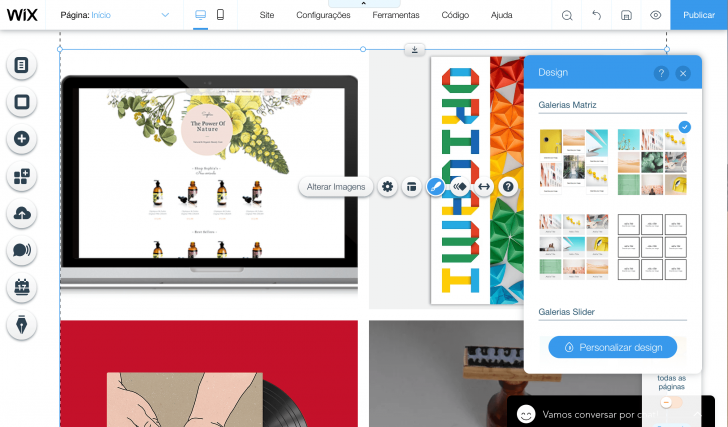
Creating websites can be more challenging based on the level of customization or complexity involved. The more personalized and intricate the website, the more effort is required in its creation. This applies not only to Wix but also to other platforms like WordPress. If you’re unsure which tool to use, consider reading our comparison of Wix and WordPress.
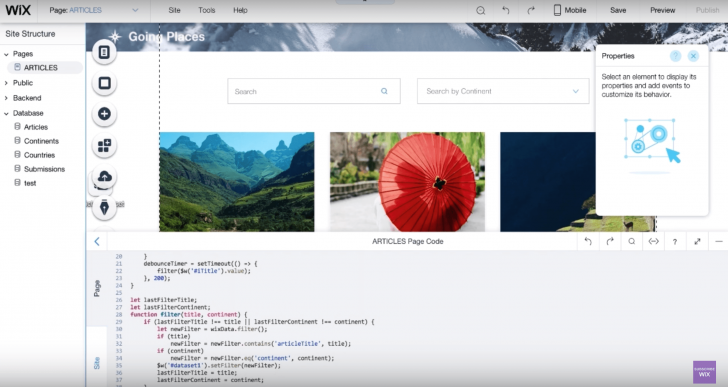
When you go back to the Wix Editor, one notable benefit is the higher level of customization available compared to ADI. You can even modify the site codes using Wix Code, a feature developed by the company a couple of years ago.
Wix Code offers the ability to make direct edits to the code, a feature uncommon in website building platforms. It enables you to develop database collections, incorporate functionality using JavaScript and Wix APIs, design personalized user input forms, implement repeat layouts, and more.
To utilize Wix Code, simply select the “Code” option in the top menu and activate the developer tool. This will reveal the advanced editing functions in the editor. Deactivation is done by clicking again.
chsyys/FreePik
Even if you lack coding knowledge, this function could prove beneficial down the line. If you choose to advance your website and enlist a developer’s assistance, access to the site’s code will be necessary for implementing the necessary adjustments, which is not feasible with ADI Wix.
Wix ADI
The website creation process with ADI is more user-friendly, with simplified stages accessible to non-designers.
ADI Wix functions as a digital aide that builds a website by using the user’s input regarding the desired website type and features. The options in ADI encompass online sales, bookings, scheduling, blog, and contact form.
The tool continues to gather images and details from the internet related to your business to include on the website. This is beneficial for individuals with content and images available on platforms like Google Maps.
The website’s appearance is determined by the chosen theme and customized color palette created by ADI. Users can also choose from other preset palettes if they prefer. The feature of creating a color palette through the logo is particularly helpful for users who may have a brand but are unsure of the exact color codes. This simplifies the process of replicating brand colors without requiring any design knowledge, as Wix ADI automatically identifies the colors for you.
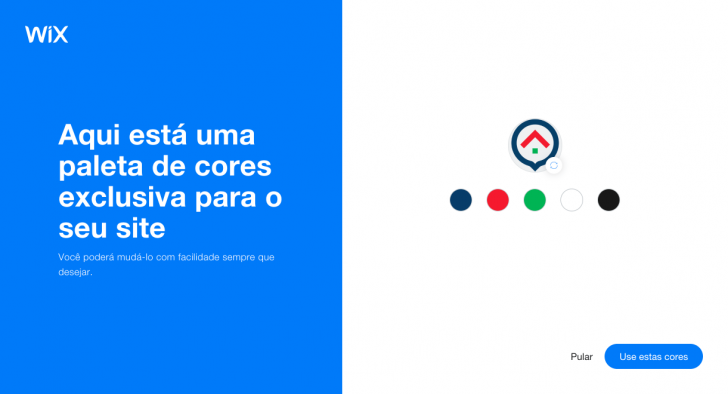
After creating the initial version of the website, you have the flexibility to modify and personalize the entire site. You can easily adjust and customize sections and pages by utilizing pre-designed templates. All aspects including text, fonts, colors, images, and sections can be edited.
chsyys/PixaBay
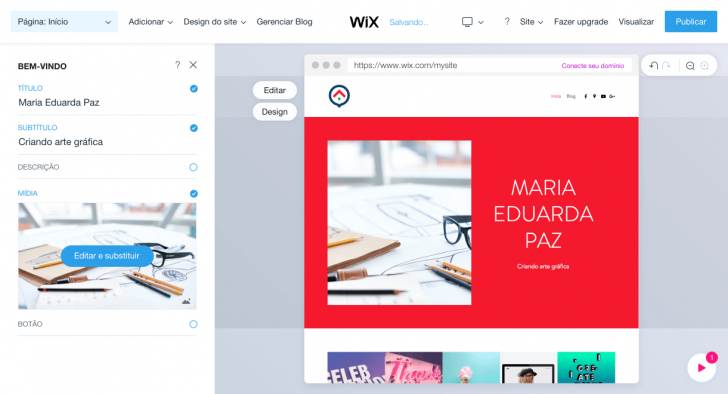
The mobile site is generated automatically and can be customized independently from the desktop version, just like with the Wix Editor.
Resources and applications
When building a website, it is typical for it to include specific features suited to its industry. For instance, a hostel website may have an online booking option, while a private tutor’s site might offer scheduling capabilities.
It is possible to enhance a website in Wix by adding various features using applications, which are referred to as such. In this aspect, the Wix Editor exceeds the capabilities of Wix ADI.
Wix Editor
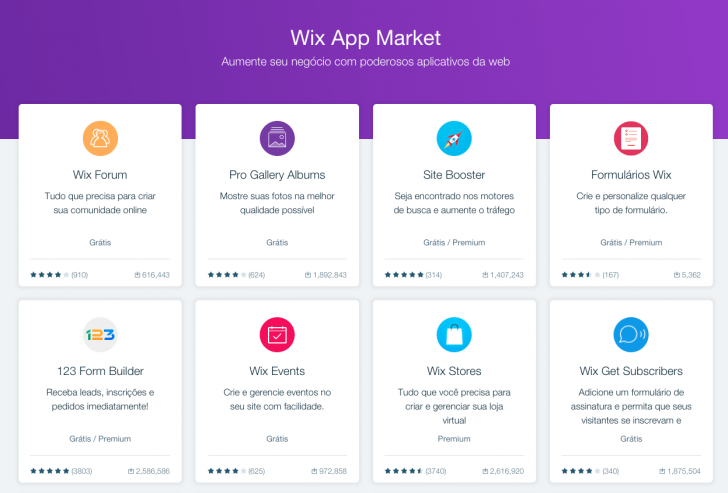
Wix App Market provides a variety of apps, including over 100 free ones developed by Wix, alongside third-party apps such as Google Adsense and Google Analytics. You can find the complete list of apps on the Wix website.
Wix ADI
Wix ADI provides four free and helpful applications: blog, online store, chat, and scheduling. However, it offers a smaller range of applications compared to Wix Editor.

When using Wix ADI, users have access to all the platform’s applications by switching to the Wix Editor without any additional cost. However, it is important to note that migrating back to ADI will result in the loss of any changes made in the Editor.
Plans and pricing
Plans and prices for Wix Editor and ADI Wix users are the same, with both offering free and paid options that come with additional features. See the complete plan table below.
| Resources/Planes | Free | Connect Domain | Combo | Unlimited | eCommerce | VIP |
|---|---|---|---|---|---|---|
| Custom domain | No | Yeah. | Yeah. | Yeah. | Yeah. | Yeah. |
| Support Premium | No | Yeah. | Yeah. | Yeah. | Yeah. | Yeah. |
| Ad removal | No | No | Yeah. | Yeah. | Yeah. | Yeah. |
| Google AdWords Coupon | No | No | Yeah. | Yeah. | Yeah. | Yeah. |
| Custom Favicon | No | No | Yeah. | Yeah. | Yeah. | Yeah. |
| Virtual store | No | No | No | No | Yeah. | Yeah. |
| Priority response | No | No | No | No | No | Yeah. |
| Email campaigns | No | No | No | No | No | 10 per month |
| Bandwidth | 500 MB | 1 GB | 2 GB | Unlimited | Unlimited | Unlimited |
| Space | 500 MB | 500 MB | 3 GB | 10 GB | 20 GB | 20 GB |
| Price (monthly) | Free | $ 9,50 | R$19 | $ 28,90 | $ 37,25 | $ 57,29 |
| Visit | Visit | Visit | Visit | Visit | Visit |
Which should you select: Wix Editor or Wix ADI?
The Wix Editor provides a greater range of features compared to ADI Wix, which is more user-friendly. This distinction makes each mode suitable for different types of websites and users.
ADI Wix is a great tool for building a straightforward, attractive, and quick website. As a virtual assistant, it takes on a significant portion of the work.
The Wix Editor offers a variety of features to cater to different needs. Users looking to make a basic and attractive website can use the available templates for efficiency. For those seeking more advanced options, the Wix Editor also includes the Wix Code feature for code editing.
Did you discover which Wix platform suits you best? I trust my assistance was beneficial to you in that endeavor! Feel free to share your thoughts here, and I will happily reply. 🙂
If you’re prepared to build your website, head over to Wix and begin immediately!
Develop a website using Wix
Publication date: 29/11/2018 (last updated 15/04/2019)
Comparatives and Wix tags.